BigCommerce to Shopify Migration: Why Cutover Puts SEO at Risk
Plan a BigCommerce to Shopify migration with realistic timelines, the right CSV, app, or API method, and redirects that protect SEO through cutover.
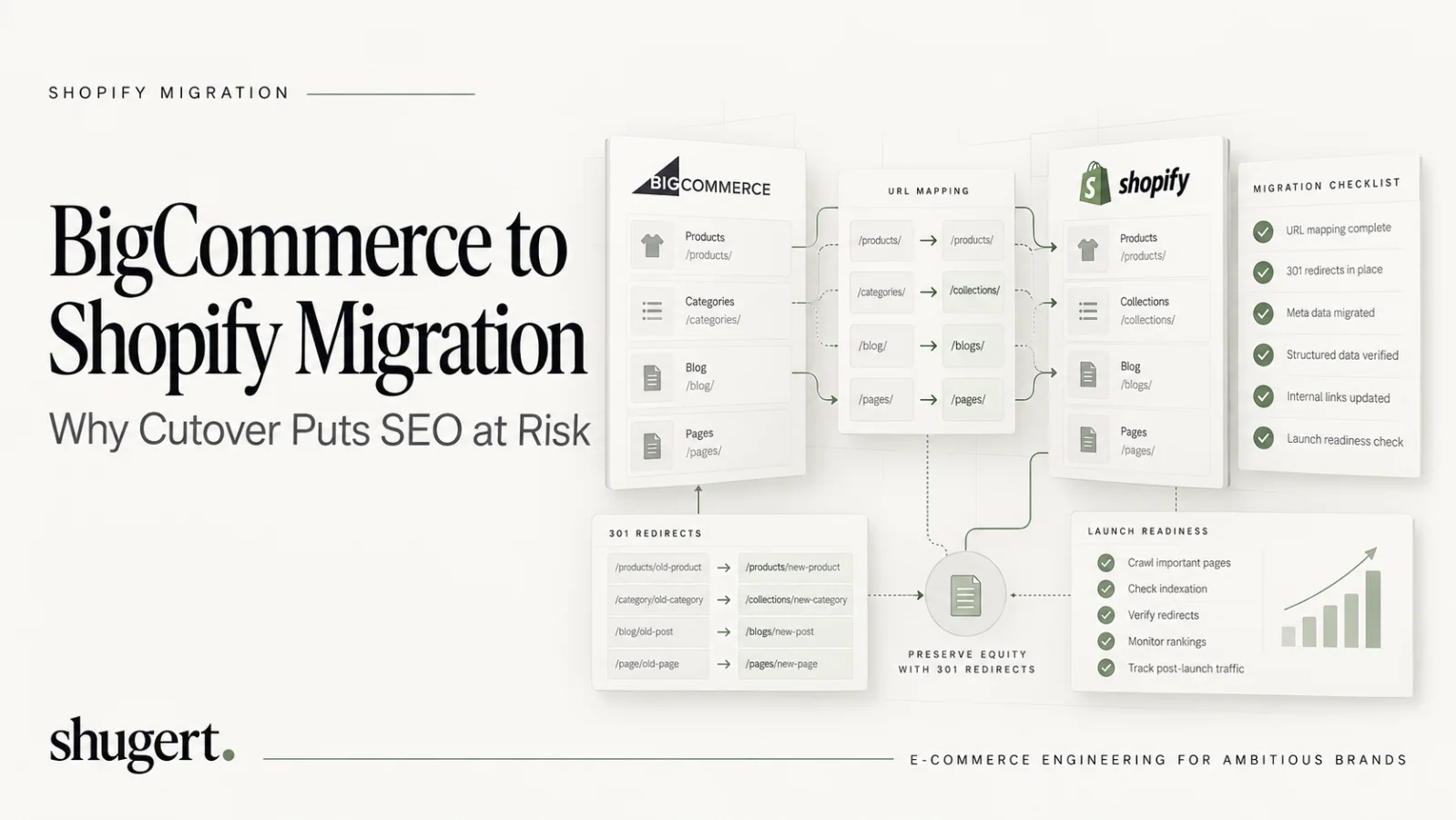
A BigCommerce-to-Shopify migration can preserve search visibility and operational data, but neither outcome is automatic. Start with a source-to-destination data inventory, a URL-level redirect map, a representative dry run, and documented go/no-go checks before storefront cutover. CSV or app-based imports can work for straightforward catalogs; complex orders, subscriptions, custom objects, and ERP integrations warrant API-based migration and senior engineering review.
Key Takeaways
Migrating from BigCommerce to Shopify is feasible, but preserving customer data and organic visibility requires explicit field mapping, URL redirects, technical QA, and post-cutover monitoring. Migration method and risk depend on the store's catalog, integrations, and historical data.
| Point | Details |
|---|---|
| Data migration complexity | Products and variants transfer smoothly via CSV or API, but order history and custom metafields often need API support. |
| Customer account limitations | Customer records import successfully, but passwords cannot transfer and must be reset after migration. |
| Importance of dry run | Running a small-scale migration first helps identify mapping errors and ensures data accuracy before full cutover. |
| Role of migration partners | Experienced partners provide controlled planning, testing, and execution, especially for large or complex stores. |
| Shugert Marketing’s approach | We offer fixed-scope BigCommerce to Shopify migrations with thorough testing, dedicated senior engineers, and transparent pricing. |
Table of Contents
- What data can you actually migrate from BigCommerce to Shopify?
- Migration methods: CSV, apps, API, or a migration partner
- Step-by-step migration process from connection to cutover
- Timeline and cost estimates by store size
- How to protect your SEO rankings during the move
- Pre-migration checklist: what to prepare before you start
- Post-launch verification: what to check first
- When does a migration need a senior-led partner?
- Shopify migration support from Shugert Marketing
- FAQ
- Sources
What data can you actually migrate from BigCommerce to Shopify?
Most of what makes a store run transfers cleanly, but a few categories need special handling and realistic expectations before you start mapping fields.
Products and variants move well through either CSV or API, including titles, descriptions, pricing, and inventory counts. Images usually carry over if the source URLs remain publicly accessible at the time of import, since Shopify’s product import tooling can pull directly from a hosted image URL according to Shopify’s product import documentation. Metafields, which store custom product attributes like material or fit, require more care: CSV handles basic fields fine, but custom metafield structures often need API work or app support to preserve.
Customer records import through CSV or an app, but one thing never comes across: passwords. Shopify’s customer import documentation confirms that passwords cannot be migrated because they are encrypted on the source platform, so every migrated customer needs an invitation to reset their password after launch.
Orders are the trickiest category. A simple CSV export can bring over basic order records, but preserving full historical order detail, line-item accuracy, and the links between orders, customers, and products at scale typically requires API-based migration. Shopify’s migration guidance recommends a specific import sequence to keep these relationships intact: products first, then customers, then historical orders, with other content types following in any order.
Here is how the major data types typically fare:
- Products and variants: migrate cleanly via CSV or API, with images intact when source URLs stay live.
- Customers: import successfully but without passwords, which must be reset post-launch.
- Orders: basic records move via CSV; full historical continuity usually needs API or app support.
- Gift cards and discounts: often require an app or custom script, since formats differ between platforms.
- Subscriptions: rarely migrate automatically and usually need a dedicated subscription app plus manual reconfiguration.
- Blogs and pages: transfer through CSV or manual copy for smaller content sets.
A short list of hard limits is worth setting expectations around early: customer passwords never migrate, some payment tokens tied to BigCommerce’s gateway configuration don’t transfer, and platform-specific custom objects (certain app-built fields or checkout customizations) usually need to be rebuilt rather than moved.
Migration methods: CSV, apps, API, or a migration partner
The right method depends on catalog size, data complexity, and how much downtime you can tolerate, not on which option sounds the most sophisticated.
CSV migration is the lowest-cost, most hands-on option. Shopify’s CSV documentation specifies that files must use UTF-8 encoding, and Shopify recommends editing CSVs in Google Sheets rather than Excel to avoid encoding corruption. CSV works well for product catalogs under a few thousand SKUs with straightforward variant structures, but it has practical limits: very large files can time out on import, field mapping between BigCommerce and Shopify columns is manual, and passwords and some order history details simply don’t fit the format.
Automated migration apps sit a step-up in convenience. They connect to both platforms, map standard fields automatically, and move products, customers, and basic orders in a few hours rather than days. The tradeoff shows up in the details: Shopify’s own migration guidance notes that these apps commonly require post-migration engineering work to fix metafields, custom attributes, and third-party integrations that don’t map cleanly between platforms. Subscriptions and gift card formats are frequent failure points.
API and custom scripting become necessary once a store has order history that must stay fully queryable, metafield structures built around BigCommerce-specific logic, or custom checkout rules that an app can’t replicate. This path takes longer to build but gives full control over how every record maps, which matters for brands that rely on historical order data for customer service, warranty tracking, or reporting.
Pro Tip: Run a small-batch API test migration on 50 to 100 records before committing to a full custom script. It surfaces field-mapping problems while they’re still cheap to fix.
Hiring a partner makes sense once the migration touches ERP systems, multi-currency storefronts, or enterprise order volume where a failed cutover is expensive. Senior-led delivery means someone has already mapped the common failure points, built the redirect strategy before launch day, and set up QA checkpoints rather than discovering problems after the store goes live. The return on hiring help here usually comes from avoided downtime and avoided SEO losses rather than from the migration itself being technically impossible to do in-house.
- CSV: lowest cost, most manual, best for simple catalogs under a few thousand SKUs.
- Migration apps: fast and broad coverage, weakest on metafields, subscriptions, and gift cards.
- API/custom scripts: necessary for full order history continuity and complex custom logic.
- Partner-led migration: best for enterprise order volume, multi-integration environments, and SEO-sensitive launches.
Step-by-step migration process from connection to cutover
A migration that goes smoothly almost always follows the same sequence, regardless of which method you use to move the data.
Before connecting anything, lock down three things: a full backup of your BigCommerce store, a written scope of exactly which data types you’re moving, and a decision on when you’ll freeze inventory changes so counts don’t drift mid-migration. Skipping the freeze window is the single most common cause of mismatched inventory after launch.
- Back up BigCommerce data. Export full product, customer, and order CSVs even if you’re using an app or API, as a fallback.
- Connect source and target stores. Generate API credentials on BigCommerce and set up the corresponding access on your new Shopify store.
- Map fields. Match product attributes, variant options, images, and metafields between platforms, flagging anything that won’t map automatically.
- Run a dry run migration. Move a representative sample, typically 5 to 10% of your catalog and order history, into a Shopify development store.
- Validate the dry run. Spot-check product counts, variant pricing, image placement, and a sample of customer and order records against the source data.
- Fix mapping issues. Resolve anything the dry run surfaced before touching the full dataset.
- Run the full migration. Move all remaining data using the validated mapping and method.
- Final sync and DNS cutover. Capture any orders or changes made during the migration window, then point your domain to the new Shopify store.
The dry run step deserves more attention than most teams give it. It’s the only point in the process where you can catch a broken field mapping, a missing image, or a mangled customer record before it affects a live store. Treat the acceptance criteria for the dry run (exact product counts, correct variant pricing, intact customer emails) as a checklist you sign off on, not a quick visual scan.
Immediately after cutover, verify the following before announcing the new store is live:
- Domain correctly points to Shopify and SSL is active.
- Test orders process successfully through your live payment gateway.
- Redirects from old BigCommerce URLs resolve to the correct new pages.
- Customer login and password reset flow works end to end.
- Core navigation, search, and checkout function without errors.
Final sync timing matters more than most migration plans account for. Any order placed on BigCommerce between your full migration run and the actual DNS cutover needs to be captured and brought over manually or through a final incremental sync, or you lose that order from your records entirely.
Timeline and cost estimates by store size
Migration timelines scale with catalog complexity and integration count far more than with raw product counts, which is why two stores with similar SKU totals can have very different project lengths.
Small stores with a few hundred SKUs, no subscriptions, and minimal custom integrations typically complete migration in a few days to one week using CSV or an app. Mid-market stores, the range where most established DTC and B2B brands fall, generally need 6 to 12 weeks when the catalog includes thousands of SKUs, multiple sales channels, or several third-party app integrations that need to be rebuilt or reconfigured on Shopify. Enterprise stores with ERP integrations, multi-storefront setups, or custom checkout logic commonly run 12 or more weeks, since each integration needs its own testing cycle before cutover.
Cost drivers stack up from several sources rather than one line item:
- App fees for migration tools, typically charged per migration or by data volume.
- Custom script development when API work is required for order history or metafields.
- Agency or engineering hours for mapping, QA, and integration rebuilds.
- SEO work including redirect mapping, sitemap updates, and post-launch monitoring.
- Integration rebuilds for ERP, subscription, loyalty, or tax tools that don’t have a direct Shopify equivalent.
A few complexity factors reliably push both timeline and cost higher: ERP integrations that need custom API connections, subscription programs that require a dedicated app plus manual re-enrollment logic, multiple storefronts or currencies running from one back end, and custom checkout rules that Shopify Plus checkout extensibility has to replicate rather than simply replace.
For stores with meaningful traffic or revenue at stake, a staged launch, migrating a subset of the catalog or a single storefront first, reduces risk and spreads cost over time rather than requiring the full budget and engineering effort in one window.
How to protect your SEO rankings during the move
Replatforming is the single biggest controllable risk to organic traffic, and it’s also the most preventable one if you treat redirects as an engineering deliverable instead of an afterthought.
Shopify’s migration checklist flags SEO continuity as high risk and recommends inventorying high-traffic URLs before building any redirect logic. Automated redirect tools that simply map old URL patterns to new ones often leave gaps on category pages, filtered collections, or blog posts with nonstandard slugs, which is exactly where organic traffic loss tends to concentrate. Detailed guidance on site migration SEO timelines echoes the same point: redirect mapping needs to happen before launch, not after traffic starts dropping.
Follow this sequence to keep rankings intact:
- Crawl your existing BigCommerce store and export a full URL list, sorted by organic traffic volume.
- Build a redirect map that pairs every high-traffic URL with its new Shopify equivalent, prioritizing top pages first.
- Implement 301 redirects on Shopify and test each one for a direct 301 status rather than a redirect chain through multiple hops.
- Update your XML sitemap to reflect only live Shopify URLs, then submit it in Google Search Console and Bing Webmaster Tools.
- Check canonical tags on key pages to confirm they point to the correct Shopify URL, not a leftover BigCommerce reference.
- Monitor crawl behavior and rankings for 30 to 60 days post-launch, watching for crawl errors or sudden ranking drops on priority pages.
Pro Tip: Test every redirect for its actual HTTP status code, not just whether it lands on the right page. Avoid chains of redirects where possible: they add requests and make migrations harder to verify. Test each important old URL for a direct, permanent redirect to the most relevant valid destination.
Structured data deserves a specific check: product schema, review markup, and breadcrumb schema often get dropped or malformed during theme migration, which can quietly affect how your pages appear in search results even when the redirect itself works correctly.
Pre-migration checklist: what to prepare before you start
A short list of prerequisites, completed before any data moves, prevents the majority of launch-day surprises.
- Export full CSVs of products, customers, and orders as a backup, even if you’re using an app or API for the actual migration.
- Generate and store API credentials for both BigCommerce and Shopify in a secure, access-controlled location.
- Audit every connected app and integration, listing which ones have a direct Shopify equivalent and which need to be rebuilt.
- Set an inventory freeze window with a specific start and end time so stock counts stay accurate during the migration run.
- Define acceptance criteria for the dry run, including exact product counts, sample order accuracy, and customer record integrity.
- Confirm your Shopify plan and apps are configured for payment gateways, shipping zones, and tax settings before importing live data.
Setting KPIs for the dry run matters more than it sounds. “It looked fine” is not an acceptance criterion.
Post-launch verification: what to check first
The first 72 hours after cutover decide whether small issues stay small or turn into lost orders and support tickets.
- Place test orders through every active payment method to confirm checkout processes correctly end to end, as Shopify’s migration documentation recommends.
- Verify shipping rates and tax calculations against known test addresses to catch misconfigured zones before a real customer does.
- Confirm analytics tracking fires correctly and that order counts in Shopify reconcile with what your backend reporting expects.
- Check customer account continuity by sending password reset invitations and spot-checking order history on a sample of migrated accounts.
- Set a monitoring cadence: hourly checks on launch day, daily checks through the first week, and weekly checks for the following 30 days.
Reconciling order counts against your pre-migration baseline is worth doing manually at least once, even if your analytics dashboard looks correct. A silent tracking gap can run for days before anyone notices if nobody checks the raw numbers against what the old platform reported.
When does a migration need a senior-led partner?
Most migration guides treat BigCommerce to Shopify as a data transfer problem. It’s really a risk management problem, and the risk isn’t losing products, it’s losing search rankings and order continuity while nobody’s watching closely enough to catch it in time.
Stores with ERP connections, revenue-critical organic URLs, complex order history, or several international storefronts need a controlled replatform rather than an app-only transfer. Reported leadership turnover at BigCommerce in 2026 is industry commentary rather than proof that a vendor is unable to serve merchants; confirm the technical and financial business case before authorizing a migration.
Senior-led delivery looks different from a self-serve app migration in a few concrete ways: the constraints get defined before any code runs (what counts as success, what data has to match exactly), releases happen in a controlled environment rather than directly on the live store, QA is a checklist against those defined constraints rather than a visual scan, and there’s a before-and-after measurement step so you can actually confirm nothing broke.
We structure migration engagements around fixed scope rather than open-ended hours, which means you know the ceiling on cost before work starts. To scope a quote accurately, we typically ask for catalog size, a list of active integrations, your highest-traffic URLs, and any SEO priorities tied to specific pages or categories.
Before deciding between in-house effort and a partner, it’s worth checking: does your team have bandwidth to own a 6 to 12 week project on top of regular work, does anyone on staff have direct experience with Shopify’s API and metafield structures, and can you afford a week of lost organic traffic if a redirect gap slips through unnoticed.
— Samuel Noriega
Shopify migration support from Shugert Marketing
Replatforming from BigCommerce doesn’t have to mean choosing between a cheap, risky DIY migration and an open-ended agency retainer. We run BigCommerce to Shopify migrations as fixed-scope engagements, which means you get a defined price and a defined deliverable before any work starts, not an hourly clock that keeps running.
Our migration work is built around the same controls we use for performance and SEO projects: a documented scope, a dry run with sign-off criteria, a controlled cutover, and a before-and-after check to confirm products, orders, and redirects landed correctly. During scoping, we ask for your catalog size, your active app integrations, which pages carry the most organic traffic, and any SEO priorities you need preserved through the move.
What that looks like in practice:
- Migration-specific scope: The Scoped Shopify Intervention is a limited engineering service, not a $2,500 end-to-end BigCommerce migration. Full replatforming requires a separate estimate covering data mapping, app replacements, redirects, implementation, cutover QA, and post-launch monitoring.
- A documented redirect and SEO continuity plan built before cutover, not patched together after traffic drops.
- Senior engineering on the implementation, with no offshore handoffs partway through the project.
If you’re weighing a migration timeline against your current BigCommerce contract or renewal date, the most useful next step is a scoping call. Bring your catalog size, integration list, and top-traffic URLs, and request a fixed-price quote to see what a scoped migration would look like for your store.
Engineering acceptance criteria before cutover
A migration is ready for release only when data parity, discoverability, and checkout operations are tested against an agreed baseline. Record source product, variant, customer, order, refund, and inventory counts; select representative edge cases including multi-location stock, bundles, metafields, and foreign currencies. Reconcile actual records, not just the job-success status.
- URL parity: verify priority legacy URLs return a single permanent redirect to an equivalent, indexable destination; reject redirect chains, unrelated homepage targets, and 404 destinations.
- SEO parity: validate canonical, robots, metadata, structured data, collection hierarchy, internal links, and alternate-language relationships across product, collection, page, and blog templates.
- Operational parity: place and refund test orders; confirm shipping, tax, customer account access, third-party integrations, and inventory updates.
- Release control: define a freeze point, rollback owner, launch-day acceptance checklist, and 24-hour / 7-day monitoring using Search Console and analytics.
SEO continuity means minimizing avoidable disruption, not promising zero ranking volatility. Search engines must recrawl redirected URLs and reevaluate replacement pages. A preserved baseline makes changes measurable and helps prioritize genuine post-launch defects.
FAQ
How do I migrate my data from BigCommerce to Shopify?
Export your products, customers, and orders from BigCommerce, then import them into Shopify using CSV files, a migration app, or API-based scripting depending on data complexity. Shopify’s migration guidance recommends importing products first, then customers, then historical orders to preserve the relationships between them.
What happened to BigCommerce?
BigCommerce remains an active ecommerce platform. A migration decision should be driven by measured platform limitations, total cost of ownership, integration requirements, checkout needs, and expected return—not unverified speculation about a vendor's leadership. Run a documented platform-fit assessment before committing to replatforming.
Is BigCommerce better than Shopify?
Neither platform is categorically better; the right fit depends on your catalog size, integration needs, and in-house technical capacity. Shopify tends to offer a larger app ecosystem and more third-party developer support, while BigCommerce has historically emphasized built-in features without needing as many apps.
How much would it cost to migrate my website to Shopify?
Costs vary by catalog and order volume, custom applications, subscriptions, localization, redirect inventory, and launch QA. A limited-scope Shopify intervention is not a complete platform migration. Request a migration-specific estimate with defined acceptance criteria, exclusions, and a post-launch support window; generic service starting prices should not be treated as a fixed BigCommerce replatforming quote.
Sources
Additional official references: Google Search Central — site moves with URL changes explains redirect mapping and search monitoring; Shopify Help Center — customer CSV imports documents the limits of importing customer records and passwords.
- Shopify Help Center | Import and export customers
- BigCommerce’s alleged executive exodus is rattling its enterprise partner network