Shopify ERP Integration for Established Stores: Webhooks vs. Batch
Compare native connectors, iPaaS, and custom middleware, then plan Shopify data flows, webhook handling, reconciliation, costs, and technical readiness.
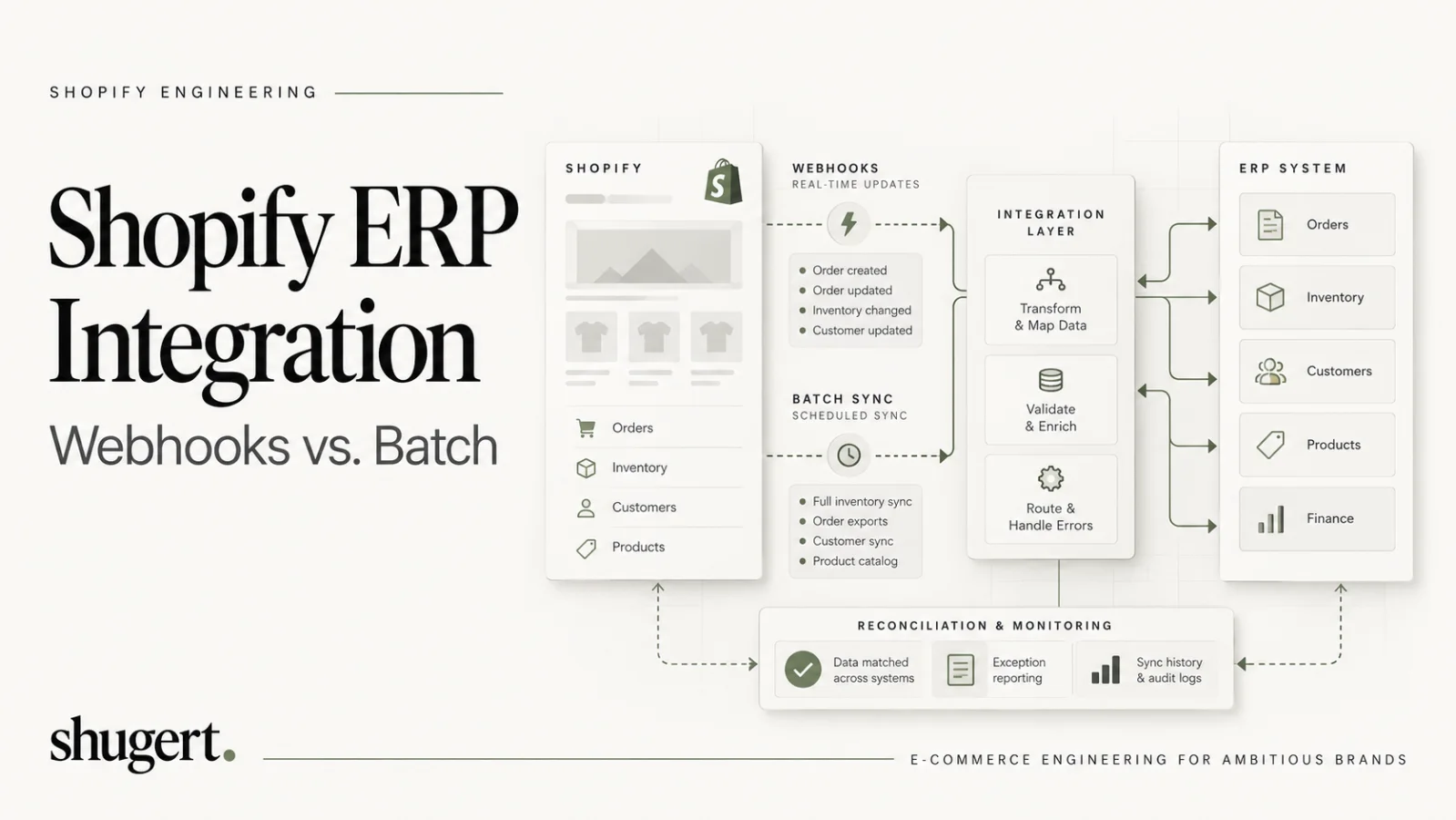
There is no universal best Shopify ERP integration pattern. A native connector can be appropriate when entities, field mappings, and exception handling match the merchant's requirements; iPaaS can reduce implementation effort for multi-system orchestration; custom middleware is justified when mapping logic, transaction volume, audit requirements, or recovery SLAs exceed connector capabilities. Whichever path you select, define ownership for orders, inventory, catalog, customers, and accounting records, then test both event-driven updates and scheduled reconciliation.
Key Takeaways
Choosing the correct Shopify integration approach depends on transaction volume, mapping complexity, SLA needs, engineering capacity, and time-to-value, with native connectors, iPaaS, and custom middleware fitting different scenarios.
| Point | Details |
|---|---|
| Native connector | Ideal for merchants with standard catalog structures and a single ERP where default field mappings are sufficient. |
| iPaaS platform | Suitable for scaling brands requiring more flexibility without managing a codebase, with license costs scaling by transaction volume. |
| Custom middleware | Best for high-volume operations, multi-ERP setups, or unique workflows where full control and ownership are necessary. |
| Monitor webhooks and reconcile financials | Prioritize webhook failure detection and accurate payout reconciliation to prevent data drift and operational issues. |
| Shugert Marketing approach | We recommend thorough diagnosis, clear ownership rules, and disciplined implementation for reliable Shopify ERP integration. |
Table of Contents
- Integration approaches: native connectors, iPaaS, custom middleware, Shopify GraphQL APIs
- Concrete data flows by domain: orders, inventory, products, customers, financials
- Shopify platform constraints: API rate limits, webhooks, retries, idempotency, and monitoring
- Reference architecture: an event-driven middleware pattern for Shopify to ERP integration
- Phased implementation plan and the primary cost drivers to budget for
- Technical readiness checklist for teams preparing to start integration work
- Shugert Marketing perspective: how a senior-led engineering partner approaches integrations
- What matters most in Shopify ERP integration planning
- Get a technical readiness assessment for your Shopify ERP integration
- FAQ
- Sources
Integration approaches: native connectors, iPaaS, custom middleware, Shopify GraphQL APIs
Each approach trades control for speed, and picking wrong shows up later as either a maintenance burden or a stalled rollout.
A native connector, like the Business Central Shopify connector, syncs items, inventory, prices, customers, and order fulfillment through the Shopify GraphQL Admin API, and requires valid licenses on both platforms. It suits merchants with standard catalog structures and a single ERP, where the vendor’s default field mappings cover most of the business logic. The tradeoff is limited flexibility: when your pricing rules, tax logic, or fulfillment workflow deviate from the connector’s assumptions, you are stuck waiting on vendor roadmaps.
An iPaaS (integration platform as a service) sits between Shopify and the ERP, offering prebuilt connectors plus a visual workflow layer for custom field mapping, transformations, and conditional logic. This fits scaling DTC brands and multi-channel B2B sellers that need more flexibility than a native connector offers but do not want to own a codebase. Maintenance shifts partly to the iPaaS vendor, though you still own the business logic configured inside it, and licensing costs scale with transaction volume.
Custom middleware, built and hosted by your team or an engineering partner, gives full control over data transformation, retry logic, and reconciliation. It fits high-volume operations, multi-ERP setups, or workflows with business rules too specific for any prebuilt tool. The ownership burden is real: your team (or your partner) owns every upgrade, every Shopify API version change, and every edge case.
Decision heuristics worth applying before you commit:
- Transaction volume: high order volume favors custom middleware or an enterprise-grade iPaaS over a native connector’s default throughput.
- Mapping complexity: unusual SKU structures, bundles, or multi-entity B2B accounts push you toward iPaaS or custom code.
- SLA requirements: near-real-time inventory accuracy for omnichannel sellers rules out daily batch-only native connectors.
- Engineering capacity: without in-house engineering, a native connector or managed iPaaS reduces long-term ownership risk.
- Time-to-value: native connectors deploy fastest; custom middleware takes the longest but pays off at scale.
Concrete data flows by domain: orders, inventory, products, customers, financials
Scoping an integration means deciding, domain by domain, what is the source of truth and how often each system needs to agree with the other.
- Orders: treat Shopify as the system of record for order creation, updates, cancellations, and fulfillment status. Webhooks deliver the full current state of the order payload, so your middleware should act on that payload directly rather than assuming partial updates, and use a reconciliation call to the Admin API when a webhook is missed, per Shopify’s own order webhook guidance. Refunds and cancellations need their own webhook topics; do not infer them from order status fields alone.
- Inventory: multi-location mapping is where most integrations break. NetSuite’s Shopify connector documentation confirms built-in support for multi-location inventory and default field mappings, but you still need to decide how reservations and committed stock translate between platforms. Near-real-time sync works for high-velocity SKUs; a nightly reconciliation job is often sufficient for slow movers.
- Products and variants: anchor every mapping on a canonical identifier, usually the Shopify product or variant ID paired with an ERP item number, and define a clear policy for metafields before you build anything. Large catalogs with thousands of variants should use bulk operations rather than per-item REST or GraphQL calls, both for speed and to avoid rate limit pressure.
- Customers: map Shopify customer records to ERP contacts or companies, and for B2B sellers, plan explicitly for multiple contacts under one company account rather than forcing a one-to-one mapping that breaks the first time a buyer has two purchasing agents.
- Financials: reconcile payouts against captured transactions, not against order totals, since a single payout can bundle multiple orders along with fees and refunds. This reconciliation pattern, drawn from how integration architects handle Shopify payout data, avoids the single most common source of finance-team distrust in a new integration.
Pro Tip: Build your financial reconciliation job to match payout reports to individual captured transactions first, then roll those up to orders, never the other way around.
Shopify platform constraints: API rate limits, webhooks, retries, idempotency, and monitoring
Every integration architecture has to respect Shopify’s own operational limits, or it will fail silently under load.
Shopify's GraphQL Admin API applies calculated query costs within an app-and-store bucket. Published restore rates vary by plan—100 points/second for Standard, 200 for Advanced, 1,000 for Plus, and 2,000 for Commerce Components—but are subject to platform policy and temporary reductions. Inspect extensions.cost and throttle based on the available budget, rather than assuming each HTTP request costs the same. For large catalog reads or eligible bulk mutations, evaluate Bulk Operations and checkpointed retries instead of an uncontrolled per-record loop.
Webhooks carry their own delivery rules. According to Shopify’s webhook verification docs, deliveries retry up to 8 times over a 4-hour window, and a subscription is deleted after 8 consecutive failures, so an unmonitored endpoint can silently stop receiving data. Build for this with:
- A fast 2xx acknowledgement on receipt, with heavier processing handled asynchronously in a worker queue.
- HMAC verification of every payload using the
X-Shopify-Hmac-SHA256header against the raw request body. - Deduplication keyed on
X-Shopify-Webhook-Id, since retries and redeliveries can produce duplicate payloads. - Operational alerts: define a baseline for webhook failure, queue lag, dead-letter volume, missing event subscriptions, and reconciliation differences. Alert on sustained deviations from the agreed SLA; a universal 0.5% threshold is not a substitute for merchant-specific objectives.
When monitoring surfaces a gap, whether from deleted subscriptions or unmonitored failures that cause data drift, the fix is a scheduled re-import from the Admin API rather than waiting on the next webhook to arrive.
Reference architecture: an event-driven middleware pattern for Shopify to ERP integration
A workable architecture separates fast acknowledgement from slow processing, and separates real-time events from bulk reconciliation, often using lightweight internal apps and dashboards from spreadsheets to manage reconciliation tasks via platforms like Gainable.
The core components:
- Webhook receiver: a lightweight endpoint that verifies HMAC signatures, returns a 2xx response within about a second, and pushes the raw payload onto a queue.
- Message queue: SQS, Kafka, or an equivalent, decoupling ingestion from processing so a slow ERP write does not block webhook acknowledgement.
- Worker pools: consumers that transform payloads, apply business rules, and write to the ERP, scaled independently per domain (orders, inventory, products).
- Bulk job scheduler: handles catalog-wide and inventory-wide syncs using Shopify’s bulk operations API, run on a cadence that matches your reconciliation needs.
- Reconciliation service: compares ERP and Shopify state on a schedule, flags mismatches, and triggers targeted re-syncs.
- Admin UI: gives operations staff visibility into failed events, retry status, and manual override controls.
Route orders and customer events through real-time webhooks, since they are low-volume and time-sensitive. Route inventory and catalog data through a mix of webhooks for incremental changes and bulk jobs for full snapshots, since catalog-wide consistency matters more than instant propagation. Treat the whole system as eventually consistent: a few seconds of lag between Shopify and the ERP is normal and should not trigger alerts by itself.
Security follows standard practice: use OAuth-issued app tokens scoped to only the data domains you need, rotate tokens on a defined schedule, enforce HTTPS everywhere, and verify HMAC signatures on every inbound webhook before processing.
Pro Tip: Give your admin UI a manual “replay event” button tied to the original webhook payload. It turns a two-hour incident into a five-minute fix.
Phased implementation plan and the primary cost drivers to budget for
A phased rollout keeps scope visible and prevents the most expensive mistake in ERP integration work: discovering a mapping gap after go-live.
- Discovery: audit existing data in Shopify and the ERP, document every custom field, pricing rule, and fulfillment exception, and confirm which system owns which domain.
- Design: produce the field-level mapping document for orders, inventory, products, customers, and financials, including how conflicts get resolved when both systems disagree.
- Build: implement connectors or middleware components against the design, starting with the highest-risk domain, usually inventory or financials.
- Test: run end-to-end tests covering normal flows, failure modes, and load, including simulated webhook retries and duplicate deliveries.
- Pilot: run the integration in shadow mode, writing to a staging ERP environment or a non-production ledger, while comparing output against the legacy process.
- Go-live: cut over with a rollback plan ready, typically starting with a subset of order volume before full traffic.
- Hypercare and handover: monitor closely for the first few weeks, then hand over documentation, runbooks, and alert ownership to the team that will maintain the system.
The primary cost drivers to budget against:
- Catalog size: SKU and variant count drives both initial mapping effort and ongoing bulk job runtime.
- Location count: multi-location inventory mapping adds complexity in proportion to warehouse and 3PL count.
- Mapping complexity: custom pricing, tax, or bundling logic adds build and test time beyond default field mapping.
- Throughput: higher order volume pushes you toward more robust queueing and worker infrastructure.
- SLA requirements: near-real-time requirements cost more to build and monitor than daily batch tolerance.
- Licensing: iPaaS platforms typically charge by transaction volume or connector count, a recurring cost separate from implementation.
- QA effort: the more financial and inventory logic is custom, the more test scenarios you need before trusting the system with live data.
Technical readiness checklist for teams preparing to start integration work
Before any integration work starts, confirm the following are in place, since gaps here are the most common cause of delayed timelines.
- Access and permissions: Shopify admin roles with the scopes your integration needs, ERP API credentials, and a non-production test tenant on both sides.
- Data hygiene: a canonical identifier strategy for products and customers, normalized SKUs, and a documented policy for what lives in metafields versus native ERP fields.
- Operational readiness: monitoring and logging in place before go-live, a defined retry policy, a reconciliation schedule, and an incident response SLA for data mismatches.
- Testing readiness: realistic test data volumes, working sandboxes on both platforms, and a rollback or compensating-transaction plan for failed syncs.
| Readiness area | What to confirm | Why it matters |
|---|---|---|
| Access | Admin API scopes and ERP credentials issued to the build team | Blocks development start if missing |
| Data hygiene | Canonical IDs and SKU normalization documented | Prevents duplicate or mismatched records |
| Monitoring | Alerting on webhook failure rate and queue depth | Catches drift before it compounds |
| Testing | Sandbox environments with realistic data volume | Surfaces load issues before go-live |
Shugert Marketing perspective: how a senior-led engineering partner approaches integrations
We approach every Shopify to ERP integration as a disciplined engineering project: diagnose the actual constraint first, define measurable acceptance criteria, implement in a controlled environment, QA the release against those criteria, and measure the before-and-after state rather than assuming success.
This approach fits established brands with real transaction volume and complex catalog or multi-entity structures, where a misconfigured mapping has direct financial consequences. Teams without dedicated in-house Shopify engineering benefit most from a senior-led partner, since junior implementation on webhook retry logic or inventory reconciliation tends to surface as data drift months later rather than as an obvious failure at launch. For merchants weighing a custom middleware build, our custom Shopify development work covers exactly this kind of integration engineering, scoped against the business constraints identified during discovery.
What matters most in Shopify ERP integration planning
The conventional advice treats integration platform choice as the central decision, and it is not. The platform matters far less than whether your team has defined, in writing, which system owns each data domain and what happens when Shopify and the ERP disagree. Even an expensive custom middleware layer cannot resolve unclear data ownership; a suitable native connector with an explicit ownership model can be safer and easier to operate.
Two frequently underestimated operational risks are webhook delivery failures and financial reconciliation gaps. Teams spend their planning budget on mapping diagrams and almost none on what happens when a webhook subscription silently stops delivering, or when a payout does not match the orders it is supposed to cover. Prioritize monitoring and reconciliation design before you finalize which integration pattern to build. The pattern is reversible. A quarter of undetected inventory drift or unreconciled payouts is not.
— Samuel Noriega
Get a technical readiness assessment for your Shopify ERP integration
If you are evaluating a Shopify to ERP integration and want a clear picture of scope before committing budget, a technical readiness assessment paired with a scoped implementation plan covering architecture, data mapping, and cost drivers specific to your systems can be valuable.
You can request a scoped quote directly through our get a quote page, or review our fixed-price service pricing first if you want budget ranges before a conversation. After you submit a request, expect a short discovery call focused on your current ERP, order volume, and data complexity, followed by a written scope and timeline.
Integration acceptance tests: the scenarios that reveal data drift
Architecture diagrams are not acceptance tests. Before go-live, agree on system-of-record ownership per entity, maximum tolerable delay per event type, reconciliation frequency, and who can repair an exception. For a Shopify ERP integration, the minimum rehearsal should cover the following.
- Duplicate order delivery: replay the same signed webhook twice and confirm the ERP sees one business transaction. Record the Shopify event and idempotency key in a durable log.
- Out-of-order changes: deliver fulfillment and refund updates in an unexpected sequence; reconcile using current state and versions rather than trusting event arrival order.
- Inventory divergence: reserve stock in two channels, simulate a delayed ERP response, and confirm the location-level inventory and oversell policy recover predictably.
- Interrupted processing: force an ERP outage; confirm acknowledgement timing, bounded retry/backoff, dead-letter capture, and an operator replay mechanism.
- Accounting reconciliation: match payments, fees, partial captures, refunds, and payouts against financial records independently of order totals.
A senior-led implementation should produce a source-of-truth matrix, a canonical identifier mapping, an event contract, failure/alerting thresholds, and a signed test report. These artifacts give operations and finance a way to audit an integration after handoff—not simply a promise that the connector is running.
FAQ
Can Shopify integrate with ERP?
Yes. Shopify connects to ERP platforms like NetSuite, Microsoft Dynamics 365, SAP, and Acumatica through native connectors, iPaaS platforms, or custom middleware built on Shopify’s GraphQL Admin API. The right approach depends on catalog complexity, order volume, and how much custom business logic your mapping requires.
What is ERP in Shopify?
ERP integration with Shopify means connecting your storefront to an enterprise resource planning system so that orders, inventory, products, customers, and financial data stay synchronized between the two platforms. Shopify typically acts as the source of truth for order and customer activity, while the ERP governs inventory, accounting, and fulfillment logic.
Who is Shopify’s biggest competitor?
BigCommerce, Adobe Commerce, and Salesforce Commerce Cloud compete with Shopify for some ecommerce deployments, but competitor comparisons do not select an ERP integration architecture. Assess the actual ERP, data owners, mapping coverage, API access, reconciliation requirements, and financial controls before deciding between a native connector, iPaaS, or custom middleware.
Is Odoo integrated with Shopify?
Odoo-to-Shopify integration is possible through third-party connector modules or custom API middleware; capability and maintenance responsibility depend on the specific connector and versions deployed. Validate product/variant mapping, stock locations, tax handling, returned orders, and failure replay in a non-production environment before relying on it for real orders.
How do I handle data conflicts between Shopify and my ERP?
Define a single source of truth for each data domain before you build anything, typically Shopify for orders and the ERP for inventory and financial records. When both systems can write to the same field, your middleware needs explicit conflict resolution rules and a reconciliation job that flags mismatches for manual review rather than silently overwriting one side.
Sources
Additional official references: Shopify GraphQL Admin API rate limits details query-cost budgets and per-plan restoration rates; Shopify bulk operations explains asynchronous large-scale reads and API limitations.
- Shopify Connector Overview - Business Central
- NetSuite Applications Suite - Default Mappings for Shopify Connector