Shopify Plus Checkout Extensibility: From checkout.liquid to Release
Learn how Shopify Plus checkout extensibility replaces checkout.liquid, where UI extensions and Functions fit, and how to test migrations and tracking.
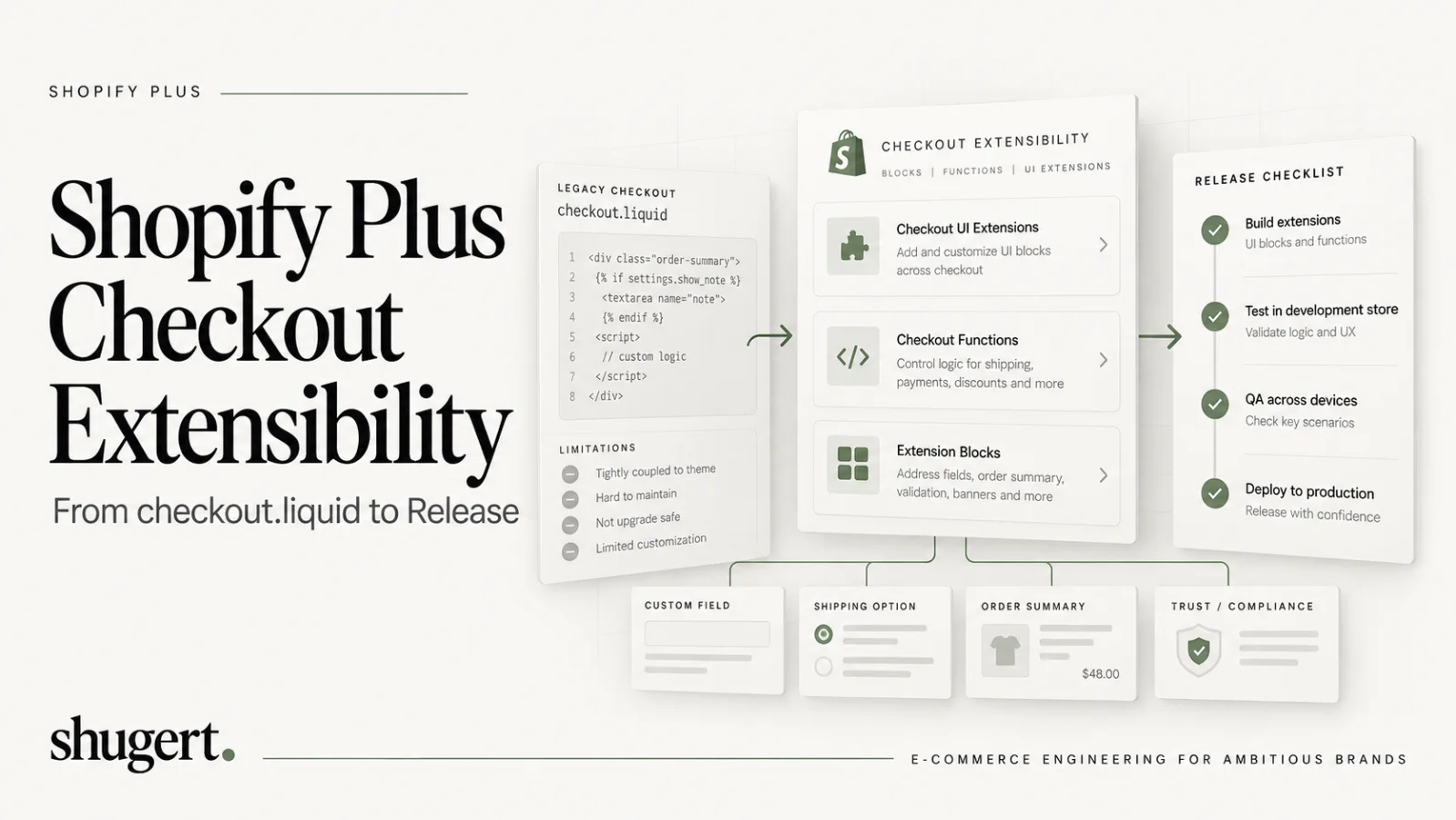
Shopify Checkout Extensibility replaces legacy checkout.liquid customizations with supported UI extensions, Shopify Functions, checkout branding, and privacy-aware web pixels. The available extension targets depend on the merchant's plan, extension type, and supported API version: core information, shipping, and payment-step customization typically requires Shopify Plus, while supported Thank You and Order Status surfaces have broader availability. Start by inventorying every legacy checkout behavior and mapping each to a supported target before scheduling a release.
Key Takeaways
Checkout UI extensions, Shopify Functions, branding APIs, and web pixels provide Shopify's supported replacement architecture for legacy checkout customizations. Individual behaviors must be remapped and tested; features, plan eligibility, and extension targets are not one-to-one substitutes.
| Point | Details |
|---|---|
| Checkout UI extensions | They replace supported checkout UI customizations with versioned extension targets and managed components. Compatibility still depends on Shopify API versions, eligible targets, and app testing. |
| Plan-specific access | Extra checkout customization options like in-step UI and Functions are limited to Shopify Plus plans. |
| Use proper APIs | Use Shopify’s APIs for reading cart, customer, and payment info, avoiding DOM scraping or hardcoded logic. |
| Branding API consistency | Define branding once with the Branding API and apply it across checkout profiles, ensuring visual consistency. |
| Shugert Marketing’s approach | We offer tailored checkout migration services, including audits, build, QA, and staged launch to ensure seamless upgrades. |
Table of Contents
- What checkout UI extensions are and where they render
- Shopify Functions and the limits of server-side checkout logic
- Checkout branding and the Checkout and Accounts Configuration API
- Mapping extension points and target APIs to real checkout features
- Web pixels and analytics tracking in a sandboxed checkout
- Migrating off checkout.liquid and legacy script tags
- App compatibility and how extensions activate in the checkout editor
- Testing, performance, accessibility, and analytics validation before release
- Practical customization examples and architecture patterns
- Checkout implementation checklist: discovery to release
- Our perspective on checkout upgrades at Shopify Plus scale
- Checkout engineering consultation: what we offer
- FAQ
- Sources
What checkout UI extensions are and where they render
Checkout UI extensions replace checkout.liquid and script tags with a structured, versioned framework: instead of injecting arbitrary markup into a Liquid template, you build with Shopify’s Polaris web components and attach them to defined extension targets. Shopify controls layout, performance, and upgrade compatibility, which is why this model survives platform updates that used to break custom checkout code.
Not every target is open to every plan. Extensions for the information, shipping, and payment steps are available only on Shopify Plus, while Thank You and Order Status page extensions are available on all plans except Shopify Starter. That distinction matters when you scope a project: a merchant on a standard plan can add order-status upsells and tracking widgets, but cannot touch the core checkout flow.
Common building blocks include:
- Information and shipping targets for custom fields, delivery instructions, or gift messaging.
- Payment targets for trust badges, financing messages, or payment-specific disclaimers.
- Cart line and buyer identity APIs for reading order contents and customer attributes before rendering anything.
- Storage API for persisting extension state across checkout steps without a backend call.
For payment-specific messaging in supported Checkout UI Extension targets, read shopify.availablePaymentOptions and shopify.selectedPaymentOptions using the APIs documented for your extension version. Payment options are read-only and vary by buyer, market, and configuration. Do not scrape the checkout DOM or assume availability means selection. Services such as third-party ecommerce risk tools are a separate fraud/risk integration consideration, not the source of Shopify's payment-extension API documentation.
Pro Tip: Build one extension per discrete merchandising goal rather than one large extension with conditional branches. It’s easier to test, disable, and hand off to another developer.
Shopify Functions and the limits of server-side checkout logic
Shopify Functions let you run custom backend logic at defined points in checkout, discount calculation, delivery option generation, payment method availability, and validation, without touching checkout.liquid. They execute inside Shopify’s infrastructure rather than your own server, which is what makes them fast and resistant to platform changes, but it also means they run under strict execution constraints.
Typical use cases include:
- Custom discount logic that can’t be expressed through native discount rules.
- Delivery option generation based on cart contents, destination, or inventory location.
- Order routing and validation that blocks or flags orders before payment.
- Payment method customization such as hiding a method for specific cart conditions.
Availability differs by app type. Public apps can ship Functions to any store that installs them, but custom-app Function APIs are restricted to Plus stores, and Shopify’s own documentation emphasizes that function performance must be prioritized because these extensions run inline with checkout, not asynchronously.
That performance constraint shapes architecture. A Function should be pure, deterministic, and fast: read inputs, compute, return a small payload. When logic depends on sequencing (a discount Function that needs delivery data a different Function produces), design clear execution order rather than relying on side effects between Functions.
Pro Tip: If a customization needs a third-party API call, fraud score, or anything with unpredictable latency, don’t put it inside a Function. Call out to an external service ahead of checkout or cache the result, and keep the Function itself to pure computation.
Checkout branding and the Checkout and Accounts Configuration API
Styling in Checkout Extensibility runs through a single interface: the Checkout and Accounts Configuration API, operated primarily through the checkoutBrandingUpsert mutation. Instead of writing CSS against checkout.liquid templates, you define typography, color, corner radius, and layout tokens once, and they apply consistently across the checkout flow, the checkout queue, and customer account pages.
There’s no per-page styling in this model. Shopify applies brand settings at the profile level, so the practical unit of work is the checkout profile, not the individual page. That’s a deliberate constraint: it keeps checkout visually consistent and prevents the kind of fragmented styling that made legacy checkout.liquid customizations fragile across updates.
Working safely with this API means:
- Use draft profiles to test styling changes before publishing to live checkout.
- Organize market-specific overrides by profile rather than custom logic, since checkout profiles support market-level variations natively.
- Preview changes in the checkout editor before publishing, since the editor renders the actual branding tokens live.
- Avoid rebuilding native styling controls in a UI extension when the Branding API already exposes the token.
For most Shopify Plus merchants, branding work is now a configuration exercise handled in the editor and API rather than a development project, which shortens the path from design approval to a live checkout.
Mapping extension points and target APIs to real checkout features
Planning a checkout build means matching each requirement to the right extension point before anyone writes code. A few rules keep that mapping accurate.
- Payment method display: payment targets are read-only for method lists. You can read available and selected payment methods and render messaging before or after them, but you cannot reorder, hide, or pre-select methods from a UI extension.
- Cart and pricing state: use the Cart Lines API and Cost API to read line items, quantities, and totals before deciding what to render, rather than estimating from partial data.
- Customer and account data: use the Buyer Identity API for logged-in status, tags, or company location, useful for B2B pricing logic or loyalty messaging.
- Cross-step persistence: use the Storage API when an extension needs to remember a choice (a gift note, a delivery preference) across checkout steps.
- Upsells and shipping rules: render these through information or shipping targets on Plus stores, driven by Cart Lines and Cost API reads rather than hardcoded thresholds.
The recurring mistake is rendering UI before confirming checkout state. Always perform the read check (payment method selected, cart contents loaded, buyer identity available) before rendering type-specific content, or you risk showing a message that contradicts what the buyer actually selected.
Web pixels and analytics tracking in a sandboxed checkout
Customer event tracking in modern checkout runs through web pixel app extensions, which execute inside a secure sandbox and subscribe to standard and custom events through Shopify’s event bus rather than reading the DOM directly. That sandbox is the architectural difference from legacy tracking scripts: a pixel receives structured event payloads (checkout started, payment info submitted, checkout completed) instead of scraping page elements for the same data.
Consent enforcement depends on how the pixel is registered and how its privacy requirements are configured. Shopify-managed app pixels can declare required analytics, marketing, preferences, and sale-of-data permissions; Shopify loads these pixels only when the applicable visitor permissions are present. Custom pixels and integrations need their own consent configuration and verification. Do not assume every pixel is blocked automatically in every market without testing the relevant privacy states.
The tradeoff is flexibility: pixels cannot write to the DOM or scrape elements, so any analytics logic built around reading rendered HTML needs to be redesigned around event payloads.
- Inventory existing pixels that rely on DOM reads and rebuild them against event payloads.
- Map legacy events to standard pixel events (checkout_started, checkout_completed) before building custom ones.
- Reconcile totals between the old script-tag implementation and the new pixel in a staging environment before cutover.
Migrating off checkout.liquid and legacy script tags
Shopify has published deprecation timelines for script tags and checkout.liquid on staggered dates depending on the checkout surface, which means the migration isn’t optional for merchants still running legacy customizations. The first and most useful step is running the checkout upgrade report in Shopify admin, which maps your existing script tags and checkout.liquid customizations directly to the extension types that replace them.
From there, most merchants choose one of three paths:
- Adopt a public app that already ships the extension you need (upsells, trust badges, delivery messaging) with no custom development.
- Build a custom app combining UI extensions and Functions when the logic is proprietary or not covered by an existing app.
- Sequence the migration, moving in-checkout customizations first since those carry the hardest deadlines, then order-status and pixel work.
Coordinate the branding pass separately from the logic migration. Moving visual elements into the checkout editor as profile-based styling first, then migrating business logic into Functions and UI extensions in small increments, reduces the risk of shipping a broken checkout in one release. Notify app vendors early. A vendor still relying on deprecated script tags will show compatibility warnings at some point in this timeline, and merchants who wait get the migration work handed to them reactively.
Pro Tip: Treat the upgrade report as a backlog, not a one-time read. Re-run it after each migration phase to confirm the previous phase actually eliminated the flagged customization.
App compatibility and how extensions activate in the checkout editor
Apps that touch checkout fall into two categories with real functional differences for Plus merchants. Public apps install extensions that any merchant can activate through the checkout editor, regardless of plan, within the limits of their extension type. Custom apps can also ship UI extensions and Functions, but custom-app Function APIs require a Shopify Plus plan, which is the key constraint when a merchant on a standard plan wants proprietary backend logic rather than what a public app offers.
Once an app ships an extension, it shows up as an activatable block inside the checkout editor rather than as code you edit directly. Checkout profiles determine which blocks are live on which checkout experience (useful for stores running different checkout configurations across markets or brands).
- Watch for compatibility banners at app install or update time. These typically flag an app that still depends on deprecated script tags.
- Confirm the extension target an app uses before installing. A Thank You page extension works on any plan; an information-step extension does not work below Plus.
- Decide build versus buy based on whether the logic is commodity (available from a public app) or genuinely proprietary (worth a custom app and a development partner).
Testing, performance, accessibility, and analytics validation before release
Checkout changes carry more risk than almost any other storefront change, so the test matrix needs to be wider than a typical feature release.
- Payment and shipping coverage: test every active payment method, shipping zone, and currency the store supports, not just the default configuration.
- Guest and logged-in flows: buyer identity data differs between the two, and extensions that read it need both paths tested.
- Multi-market behavior: confirm checkout profiles and branding overrides render correctly in each active market.
- Performance budgets: keep UI extensions and Functions lightweight. A slow Function adds latency to every checkout that triggers it, not just the one being tested.
- Accessibility: apply proper ARIA roles and visible focus states to custom controls. Checkout is a high-stakes flow for screen reader users, and Shopify’s own components handle this by default. Custom markup inside an extension does not inherit that automatically.
- Analytics reconciliation: after any pixel migration, compare event counts and conversion totals against the previous implementation for at least one full business cycle before fully retiring the old tracking.
Pro Tip: Run the full test matrix in a staging store with real payment gateway sandbox credentials. A checkout bug caught in production almost always means lost revenue, not just a support ticket.
Practical customization examples and architecture patterns
A few patterns cover most of what merchants actually ask for:
- Payment message banner: a UI extension on the payment target that reads
availablePaymentOptionsand renders a financing or installment message only when the relevant method is actually present, never a static banner. - Shipping eligibility notice: an extension reading Cart Lines API data to flag ineligible items (oversized, restricted, or backordered) before the buyer reaches the shipping step, reducing abandoned orders at payment.
- Lightweight discount Function: a Function that validates a promo code against cart contents and returns a discount or rejection in a few milliseconds, with no external API calls inside the Function itself.
- Delivery option Function: generates delivery choices based on destination and inventory location, calling an external rate service ahead of time and caching the result rather than querying it inline.
The common thread across all four: read state first, keep server-side logic minimal, and push anything slow or unpredictable outside the checkout execution path.
Checkout implementation checklist: discovery to release
Use this sequence to scope and deliver a Checkout Extensibility project without skipping the steps that cause rework later.
- Discovery: run the checkout upgrade report, inventory every existing customization, and map each one to a target extension type.
- Planning: choose public app, custom app, or implementation partner for each item, then write acceptance criteria and a test matrix.
- Build and QA: scaffold extensions and Functions, implement branding through checkout profiles, and run the full payment, market, and accessibility test pass.
- Release and monitor: roll out in stages, reconcile analytics against the prior implementation, and keep a documented rollback plan for each extension.
| Phase | Primary output |
|---|---|
| Discovery | Upgrade report and customization inventory |
| Planning | Build-versus-buy decision and acceptance criteria |
| Build and QA | Tested extensions, Functions, and branding profiles |
| Release and monitor | Staged rollout with analytics reconciliation |
Our perspective on checkout upgrades at Shopify Plus scale
We treat a checkout upgrade as an engineering migration, not a theming task. Our process starts by diagnosing the actual constraint, outdated script tags, a fragile custom checkout.liquid build, or missing Plus-level Functions, then defining scope and acceptance criteria before any code gets written. We implement in a controlled environment, QA against the full test matrix, and measure before and after rather than assuming the migration worked.
A merchant with a handful of order-status widgets can often self-serve with a public app. A merchant with proprietary discount logic, multi-market branding, or a checkout.liquid build with years of accumulated customizations usually benefits from a partner who has done this migration before.
— Samuel Noriega
Checkout engineering consultation: what we offer
We build and migrate Checkout Extensibility projects for Shopify Plus merchants who need more than a theme update, custom app development, Function implementation, UI extension builds, and checkout.liquid migrations included.
A scoped engagement with us typically includes an audit of your current checkout customizations against the upgrade report, a build-versus-buy recommendation, implementation of the extensions and Functions your scope requires, a full QA pass across payment methods and markets, and a staged rollout with analytics reconciliation. Pricing for custom development and replatforming starts at $5,000 for defined-scope work, and our Shopify Plus Engineering retainer runs from $9,000 per month for merchants who need ongoing checkout and platform support rather than a single project.
If you’re staring at an upgrade report full of deprecated script tags and need a fixed-price plan to clear it, request a quote and we’ll scope the work before you commit to anything.
Release gates for a checkout extensibility migration
Checkout changes are conversion-critical software releases. Before rollout, inventory every legacy checkout.liquid script, additional script, pixel, discount customization, and payment or shipping rule. Map each capability to an extension point, Shopify Function, pixel, app configuration, or an explicit retirement decision. Keep the original customer-facing behavior in a test matrix.
- Compatibility: verify merchant plan, extension target, Functions API eligibility, app installation requirements, and a supported version of Shopify's UI extension framework.
- Checkout journeys: exercise guest and logged-in buyers, express wallets, multiple payments, shipping configurations, discount stacking, localization, and B2B scenarios where relevant.
- Tracking and consent: compare checkout and purchase events against the prior baseline, verify regional consent states, and test event deduplication and partial refunds.
- Rollback: document which blocks, apps, and Functions can be disabled independently; stage rollout via checkout profiles where supported, with a named owner and incident checklist.
Neither a successful compile nor a visually correct checkout proves business equivalence. Sign-off must include Function behavior, payment and shipping correctness, accessibility, performance, tracking reconciliation, and a monitored go-live window.
FAQ
What is Shopify Plus checkout extensibility?
It’s the framework of Checkout UI Extensions, Shopify Functions, web pixels, and the Checkout and Accounts Configuration API that replaces checkout.liquid and Shopify Scripts for customizing checkout. On Shopify Plus, merchants get access to in-checkout UI targets and custom-app Functions that aren’t available on standard plans.
Which checkout customizations require Shopify Plus?
UI extensions on the information, shipping, and payment steps require Plus, as do custom-app Function APIs. Thank You and Order Status page extensions, along with web pixels, are available on all plans except Shopify Starter.
How do I find customizations that need to migrate off checkout.liquid?
Run the checkout upgrade report in your Shopify admin. It maps existing script tags and checkout.liquid customizations to the specific extension types that replace them, which makes it the right starting point for any migration project.
Can a public app replace a custom checkout.liquid build?
A public app can replace some eligible checkout customizations, but not every checkout.liquid feature is available on every Shopify plan or extension target. Compare the specific UI target and Function capabilities, app permissions, supported API version, and ongoing ownership before choosing an app or a custom extension. Proprietary discount and validation rules may require a custom app with appropriate Shopify Plus access.
How do web pixels handle customer consent during checkout?
Web pixels run in a sandbox and subscribe to structured events rather than scraping checkout DOM. Their behavior depends on the store's privacy configuration and the pixel's declared consent requirements. Verify analytics and marketing consent granted, denied, and changed during a session; reconcile event delivery, purchase deduplication, and attribution against the analytics backend before retiring legacy scripts.
Sources and version notes
Official technical references: Shopify's payment extension target documentation supports the available and selected payment options discussed above; Shopify web pixel privacy guidance details consent-dependent loading; Shopify's 2025-07 version notes explain the transition to Polaris web components.
Shopify's Checkout UI Extensions and Web Pixels APIs are versioned. Check payment, shipping, data-access, and consent behaviors against the app's pinned API version before implementation. Links to independent risk-management vendors elsewhere in this article are examples of external tooling and must not be mistaken for Shopify's platform API documentation.