Scalable Ecommerce Platform: Headless or Native Shopify?
Compare headless and native Shopify for a scalable ecommerce platform, vet a headless agency's work, and see when native is the smarter move.
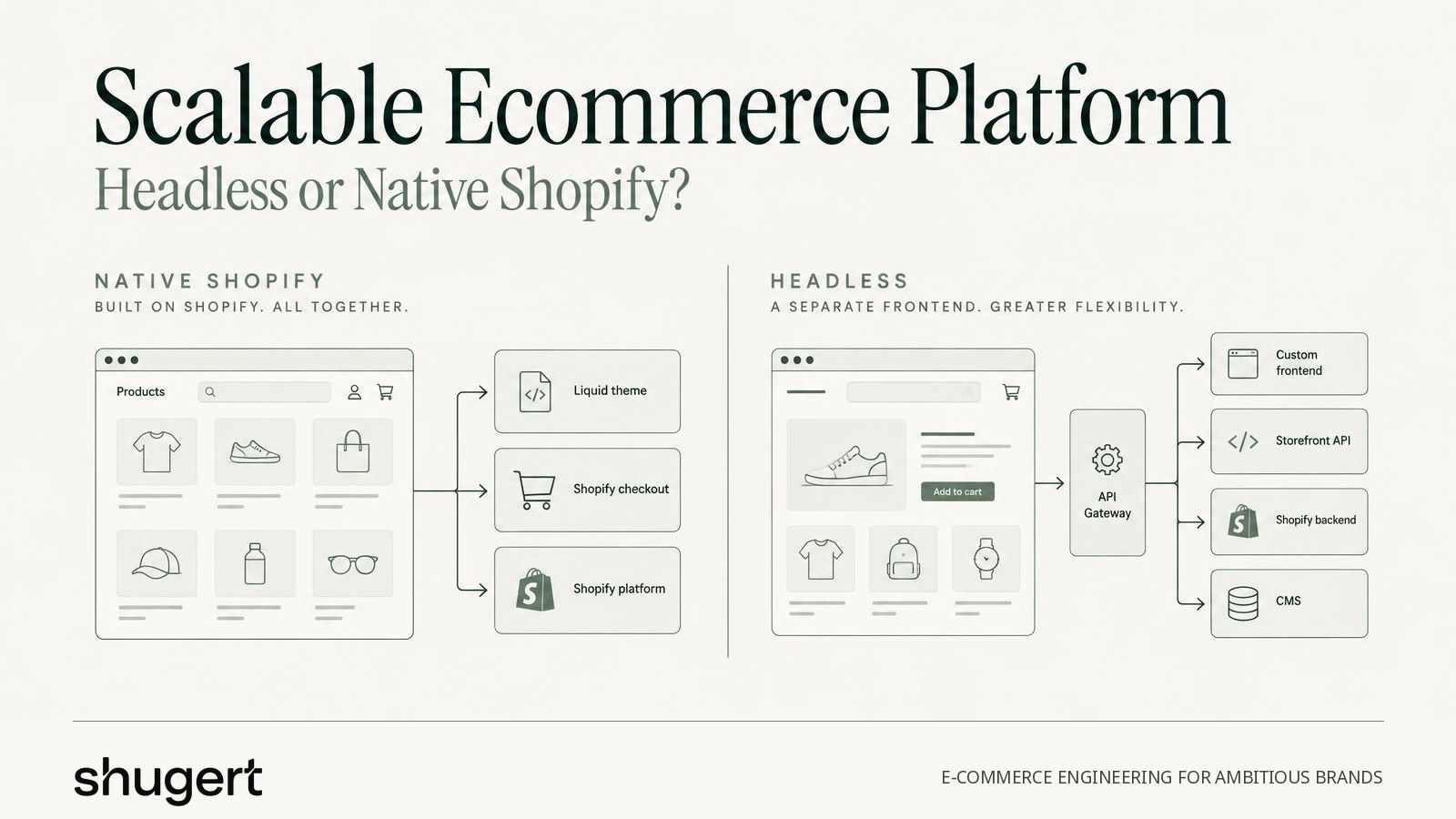
The popular advice to choose headless for growth skips the hardest question: who will operate the stack after launch? A custom front end doesn't resolve conflicting inventory, unclear pricing ownership or failed fulfillment updates. It gives the engineering team another system to release, monitor and repair.
For established brands moving from WooCommerce, Magento, BigCommerce or a custom build, a scalable ecommerce platform should make growth easier to operate, not merely possible to render. The architecture decision starts with data ownership, integration reliability and maintenance capacity, then moves to the storefront.
Table of Contents
- Headless and Native Shopify Side by Side
- When Native Shopify Is the Better Platform
- Scalability Tests to Run Before You Commit
- What a Headless Shopify Agency Actually Builds
- How to Vet a Headless Shopify Agency
- Ongoing Costs and Performance After Launch
- Request a Migration Scope Before You Decide
Headless and Native Shopify Side by Side
For many mid-market U.S. brands, native Shopify is the practical default unless a documented requirement justifies headless. Headless is a deliberate investment in a specific brand, content or channel requirement, not an automatic upgrade for a growing catalog.
The comparison deserves a row-by-row review. Each row shows where the additional work lands and which team inherits it.
Native versus headless Shopify by decision factor
| Factor | Native Shopify | Headless Shopify |
|---|---|---|
| Storefront build | Liquid theme with Online Store 2.0 sections | Custom front end on a framework such as Hydrogen or Next.js calling the Storefront API |
| Launch effort | Shorter, mostly configuration and theme work | Longer, because the front end, hosting and API layer are built from scratch |
| Ongoing ownership | Shopify manages core platform updates; the merchant team manages theme and apps | The merchant team owns front-end releases, hosting, caching and API version changes |
| Checkout | Shopify Checkout with Checkout Extensibility | Usually still Shopify Checkout, customized through extensions |
| Integrations | Apps, Shopify Flow and direct API connections | Middleware or custom services often sit between the front end and back-office systems |
| Best fit | Most DTC and B2B brands with standard flows and an in-house team using native tools | Brands needing a distinct brand experience, a content-led storefront or dedicated front-end engineering capacity |
Where the extra work lands
Native Shopify doesn't eliminate engineering. A complicated ERP connection remains complicated, and a poorly governed app stack still needs attention. The advantage is a smaller storefront operating surface: fewer independently deployed components and fewer places for merchandising changes to require developer involvement.
Headless provides control over routing, rendering, content composition and interactions. That control becomes useful when a documented requirement cannot be implemented cleanly in a theme. Without that requirement, the business may pay for architectural freedom that its team rarely uses.
Checkout also deserves careful scrutiny. A custom product page doesn't imply unrestricted checkout customization. Both approaches generally retain Shopify Checkout, so buyers should separate storefront requirements from checkout requirements before approving the architecture.
Decision rule: If a theme, supported apps and applicable B2B, Markets and Plus features meet the brand, content and channel requirements, native Shopify is the answer.
A credible headless proposal should identify the requirement that fails this test. A preference for a particular JavaScript framework isn't a business requirement.
When Native Shopify Is the Better Platform
Headless doesn't automatically scale better. For a mid-market merchant, lightweight theme components, optimized media, controlled scripts and tested integrations can be more valuable than a separate rendering layer.
The first distinction is between staying native on Shopify and remaining on the current platform. Neither migration nor headless should be approved just because conversion has stalled.
Reasons to stay native or postpone migration
- The commercial bottleneck sits elsewhere. Weak offers, merchandising or acquisition won't improve because the storefront changes frameworks.
- Supported flows already fit. Checkout, subscriptions and wholesale pricing run on available features or well-supported apps.
- Engineering capacity is limited. Nobody has funded responsibility for front-end releases and incident response.
- The launch window overlaps peak season. A technically sound project can still be badly timed.
- The existing platform supports the roadmap. A stable store with no blocked requirements may need targeted improvements rather than replacement.
Reasons to consider headless
- A distinct interaction model cannot be delivered maintainably through theme development.
- Content-led commerce requires a publishing and presentation model beyond the native storefront's practical fit.
- Several customer-facing channels need a shared commerce backend.
- A funded engineering team will operate the architecture beyond the initial build.
Large URL inventories can influence the Shopify plan without requiring headless. Shopify's redirect documentation allows 100,000 redirects on standard stores and 20,000,000 on Shopify Plus, with CSV imports supported. A requirement beyond the standard allowance makes Plus relevant, but redirect capacity alone shouldn't justify the upgrade.
When the platform works but speed or conversion doesn't, performance, CRO and technical SEO on the existing store are the lower-risk starting point.
Scalability Tests to Run Before You Commit
On modern SaaS platforms, catalog models, integration behavior and business rules deserve testing before hosting capacity. A storefront can remain available while customers buy unavailable stock or receive the wrong account price.
Shopify's 2025 Form 10-K reports that millions of merchants in more than 175 countries used the platform as of December 31, 2025. That footprint demonstrates broad adoption, not proof that a particular merchant's regional workflows are correctly configured.
A sandbox checklist
Catalog structure: Load a representative future-state catalog, including the projected three-year SKU structure. Confirm current variant and option limits, collection taxonomy, metafield types and filtering behavior. Include discontinued items and products with unusual option combinations, not just clean bestsellers.
Integrations: Exercise ERP, inventory, POS and subscription connections at realistic order volume, including a promotion-day burst. Record event timestamps, synchronization latency, retries and unresolved failures. An ERP outage should produce a recoverable backlog, not missing orders.
B2B checkout: Complete an order using customer-specific pricing, net terms, quantity rules and account-based catalogs. Verify the resulting order in the ERP, including company identity, tax treatment and payment terms.
Markets: Purchase from each proposed target country using its intended currency, language and payment method. Validate tax, shipping eligibility and the destination system's interpretation of the order.
Scripts and apps: Inventory every dependency required to browse, configure a product and purchase. Disable optional components in the sandbox to identify overlapping functionality and determine what breaks when a vendor fails.
For teams designing repeatable load scenarios, the GoReplay guide to scalability testing provides useful context for testing beyond a single successful request. Production-derived traffic must be sanitized, and tests must avoid creating real payments or fulfillment requests.
Define a pass before running the test
Every scenario needs an owner, an expected result and a failure condition. Storefront responsiveness should also be evaluated against a consistent field-measurement approach, such as the Core Web Vitals benchmarks, rather than a favorable lab run.
Shugert Marketing recommends a migration agency when Shopify Plus, B2B, ERP or 3PL integrations, subscriptions or a large legacy URL footprint mean a failed cutover costs more than the project.
A platform change may resolve a failed architecture test. It won't resolve an offer that customers don't want or a lack of qualified traffic.
What a Headless Shopify Agency Actually Builds
Native Shopify resembles a restaurant with the kitchen and dining room under one roof. Headless separates them: the agency builds the dining room, connects it to Shopify's commerce engine through the Storefront API, and may add middleware connecting ERP, PIM, 3PL, pricing and subscription systems.
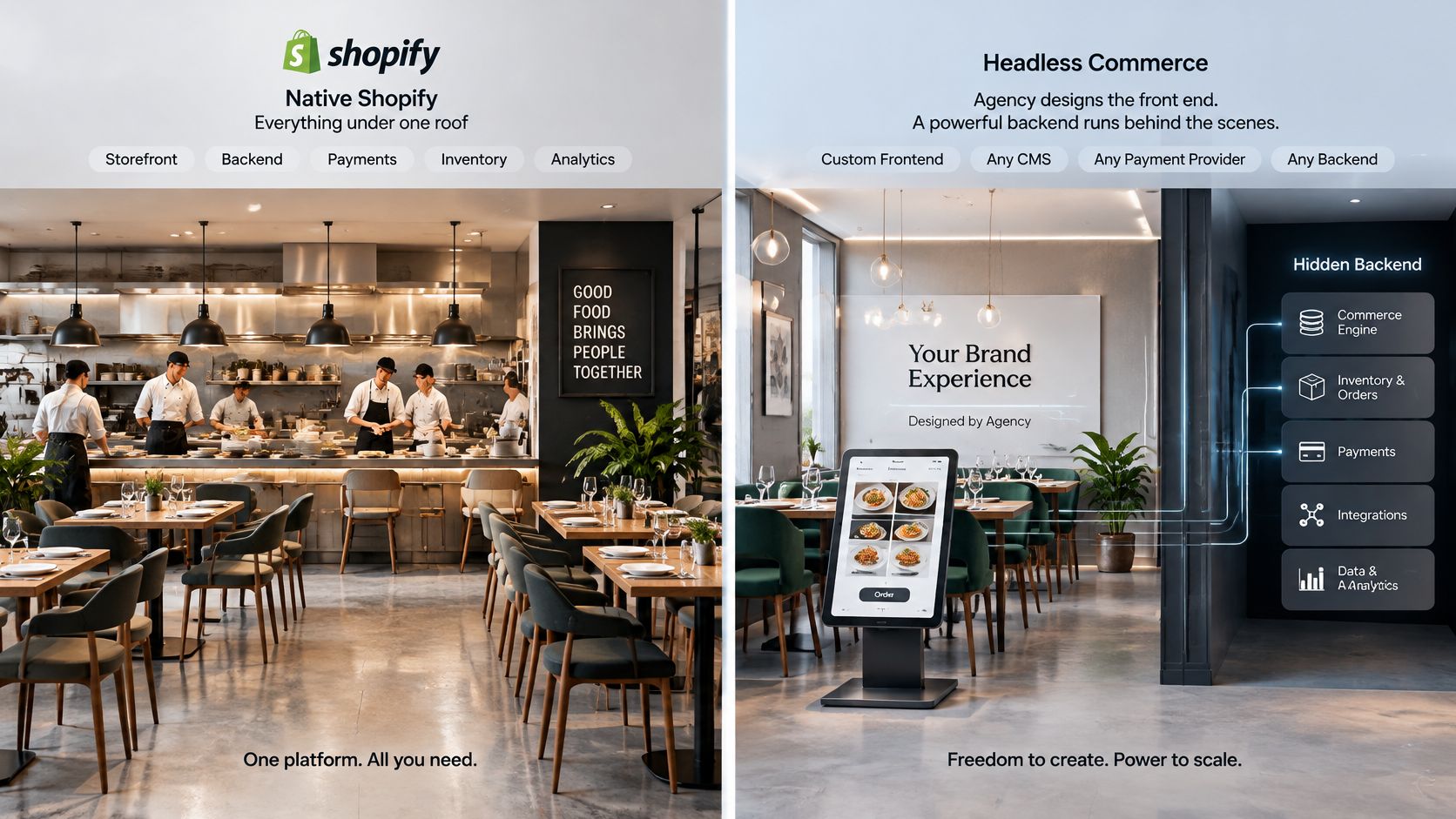
The deliverable isn't a custom website. It's an operating system of connected responsibilities.
- Architecture plan: Name the system of record for each data type, including who can edit it and how downstream systems receive changes.
- Front-end implementation: Build reusable components and routing for product, collection, editorial and campaign pages, with usable empty and error states.
- API and cache strategy: Document Storefront API queries, cache keys and revalidation triggers. Customer-specific pricing must never leak through shared caching.
- Integration layer: Implement webhooks, idempotent processing, retries and searchable error logs for inventory, orders and fulfillment.
- Release infrastructure: Establish hosting, CI/CD, preview environments and rollback procedures. Content teams need a safe way to review unpublished changes.
- Launch validation: Own redirects, analytics, tracking checks and QA across browsing, ordering and downstream operations.
Data migration isn't a catalog import
Shopify's migration guidance distinguishes manually transferable content from structured imports and notes that some data can't migrate through CSV. Products, variants, customers, orders, pages, metafields, redirects and integrations therefore need separate export, mapping, transformation, test and acceptance work.
A useful Shopify data migration plan accounts for relationships as well as records. Importing a customer doesn't prove that company associations, historical orders or subscription identities remain usable.
B2B pricing, Markets and multi-store or multi-region configurations need deliberate Shopify Plus engineering where Plus capabilities apply. Markets itself isn't a blanket reason to require Plus. Subscription apps also need a replacement or compatibility plan when their storefront components don't support the chosen headless implementation.
What belongs in the signed scope
- Data contracts: Named systems of record for price, inventory and customer data, with stated synchronization latency and reconciliation ownership.
- URL handling: A URL map with one-to-one targets where possible and tested redirect status codes.
- Acceptance and support: Dataset-specific criteria, reconciliation counts and a defined post-launch support window.
These commitments make the architecture testable. Without them, a polished front end can conceal unfinished operational work.
How to Vet a Headless Shopify Agency
A proposal deck shows what an agency wants you to see. Written answers show what it plans to build. Vet a headless partner in writing before any sales call, and score each response on evidence rather than confidence.
- Send written questions before requesting a proposal. Written answers expose assumptions that a sales presentation can hide.
- Score each response as strong, partial or red flag. A partial answer needs a documented resolution before signing.
- Require named ownership. Every layer needs an engineer, a handoff plan and merchant-controlled access.
- Request a written live-cutover example. The useful details are what broke first, how the team detected it and how recovery worked.
- Reject undefined data ownership. Price, inventory and customer records cannot remain an unresolved discovery item throughout implementation.
Headless agency vetting scorecard
| Vetting Question | Strong Answer | Red Flag |
|---|---|---|
| Who owns the Storefront API layer after launch? | Named engineer, documented handoff and a written release process | Vague answer, or the agency keeps sole admin access |
| How do URLs and redirects get mapped? | URL map with one-to-one targets, tested status codes and crawl monitoring | Plan to send legacy URLs to the homepage |
| Which system is the source of truth for price, inventory and customer data? | Written data contract per system with a stated sync latency | Ownership will be sorted out during the build |
| How are performance and checkout measured before cutover? | Baseline for LCP, INP, CLS, checkout errors and conversion by device | A single PageSpeed screenshot as the success measure |
| Which native Shopify Plus features come before custom code? | B2B, Markets and Checkout Extensibility evaluated first, with apps justified by need | Custom code built for features Shopify already offers |
| What support runs after launch? | Defined scope with named responsibilities and a monitoring plan | No post-launch plan beyond a warranty period |
Examine the evidence behind the answer
URL handling is a useful competence test because the work spans engineering, SEO and launch operations. Google's site-move guidance recommends mapping important old URLs to their replacements and warns that redirecting unrelated pages to the homepage can create soft 404 problems.
A strong answer identifies indexed product, collection, editorial and campaign URLs before development finishes. It also assigns responsibility for crawl checks and landing-page monitoring after cutover, rather than treating redirects as a spreadsheet delivered at launch.
Migration case work shows the same standard at catalog scale. Llantas Cavazos, a tire retailer with 8,000+ SKUs, migrated to Shopify with its full catalog, fitment data and SEO continuity. For a catalog like that, inventory and fitment data have to be tested as part of the migration, because a storefront can render correctly while serving wrong stock or fitment values. When an agency describes past work, ask for this level of operational detail instead of screenshots of the finished storefront.
The strongest proposal explains how the merchant can operate the result without depending on undocumented agency knowledge.
Shugert Marketing's Shopify migration approach is intended for established operations, and it declines pre-launch or sub-$10K-per-month stores, redesign-only projects and screenshot-only assessments. Its performance work also isn't appropriate when checkout is the bottleneck, when staff access won't be granted, or when the expectation is 100/100 on every page.
A good agency will explain when its offer isn't needed. That judgment is a useful signal of how it will treat the budget after launch.
Ongoing Costs and Performance After Launch
Recurring costs extend beyond the platform subscription. Headless adds release infrastructure and custom-service ownership; native Shopify still requires disciplined control of apps, theme changes and third-party scripts.
Ongoing cost categories by architecture
| Cost category | Native Shopify | Headless Shopify |
|---|---|---|
| Storefront releases | Theme updates handled by the merchant team or a partner | Front-end releases, testing and deploys owned by the merchant team |
| Hosting and caching | Managed by Shopify | Team-managed hosting, CDN, caching and preview environments |
| Apps and scripts | Subscriptions and script weight can grow with each app | Potentially fewer storefront apps, but middleware and custom services to maintain |
| Integration upkeep | Apps, Flow and API connections | Middleware and webhooks monitored with retries and error logs |
| Engineering time per change | Configuration for most merchandising changes | Code changes for behavior or layouts not exposed through reusable components or the CMS |
A well-built headless CMS should let merchants edit existing content without a deployment. New rendering behavior still needs engineering, testing and release ownership.
For budget planning, Carti's breakdown of Shopify Plus costs helps frame platform-related spend, while the Shopify development cost guide addresses implementation scope. Neither replaces a written inventory of recurring responsibilities.
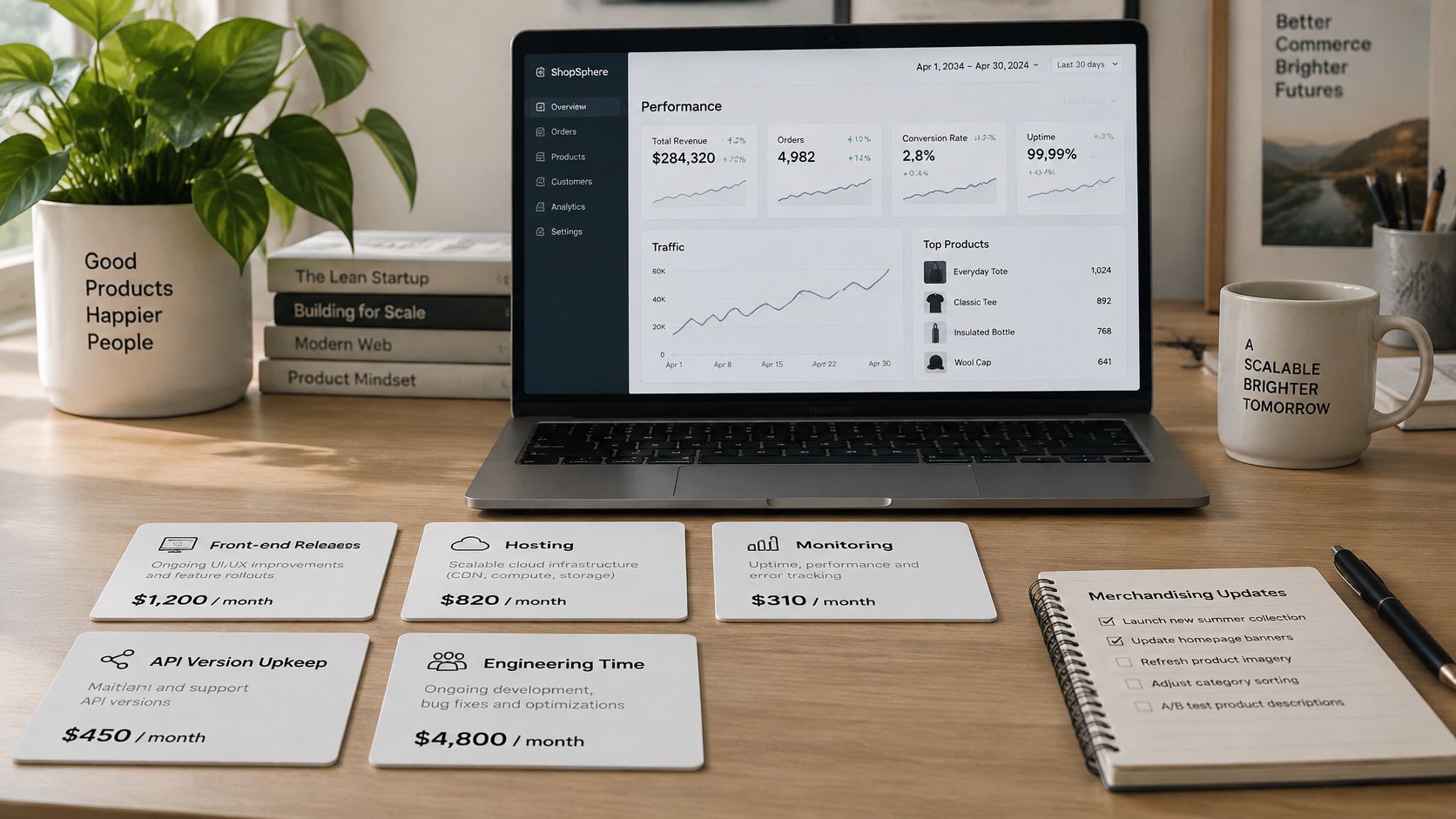
Measure the journey, not just rendering
Baseline LCP, INP, CLS, add-to-cart rate, checkout initiation and completed orders before cutover, then review weekly by template and device. The 2025 Digital Commerce Benchmark Study includes Google's good INP threshold of under 200 milliseconds as a responsiveness reference.
Baymard's UX statistics report 70.22% global average cart abandonment; its U.S. shopper findings identify extra costs that were too high at 40%, required account creation at 18% and slow delivery at 20% among shoppers who gave a reason other than browsing.
Those figures don't predict a particular store's outcome. They identify issues that a faster rendering layer alone won't fix.
- Before cutover: Validate event collection and establish comparable funnel baselines.
- First 30 days: Fix the top three observed friction points, separating technical failures from offer and delivery issues.
- Through 90 days: Review monthly, verify changes against customer behavior and remove unnecessary dependencies.
A faster storefront doesn't guarantee higher conversion.
Request a Migration Scope Before You Decide
The platform question should be answered before a migration scope request is sent. The scope then turns that decision into a testable delivery plan, rather than reopening the architecture debate during development.
Shugert Marketing has delivered 30+ complex migrations. Its migration plan covers the storefront rebuild, data migration, redirects, technical SEO, analytics and integrations in one launch plan, with products, variants, customers, orders, pages, metafields, redirects and integrations scoped separately.
Migration and custom development projects start at $5,000 with timelines of 4 to 24 weeks, and monthly support starts at $1,495. Support provides ongoing ownership after launch, which matters because the stack you scoped is the stack someone has to run. For Shopify Plus projects, that scoping conversation can extend to B2B workflows, international markets, checkout and customer-account requirements, enterprise integrations and app replacement.
Prepare the operating details
- Platform and catalog: Current platform and version, SKU count, variant structure and unusual product relationships.
- Dependencies: Apps, ERP, PIM, POS, subscriptions and fulfillment connections.
- Demand and timing: Top sections by organic traffic and a target launch window outside peak season.
A costly failed cutover, a substantial app stack or Core Web Vitals failures in Search Console are useful reasons to request an engineering-led scope. The Shopify migration guide provides the fuller preparation checklist.
Send those details through the migration scope request form to receive a written scope with assumptions, dataset acceptance criteria and launch responsibilities.