Custom Shopify Theme Development in 2027: Build vs. Customize
A practical 2027 decision guide to choosing between theme configuration, custom sections, a fully custom Shopify theme, and integrations—without sacrificing SEO or maintainability.
If your Shopify store is slow, hard to update or out of step with how orders actually flow through your business, start by finding the constraint. An experienced Shopify development company should establish whether you need theme customization, a custom theme, an integration or a change to the workflow behind the storefront. For an established DTC or B2B team, the right build solves the measured problem without leaving another hard-to-maintain system behind. This 2027 planning guide helps you decide whether to improve a maintained theme, commission a custom Shopify theme, or move functionality into apps and integrations.
For development workflow and local previews, use the official Shopify CLI for themes documentation. Use shopify theme dev against a development theme; do not test release changes directly on the published theme.
Decide whether you need a custom Shopify theme
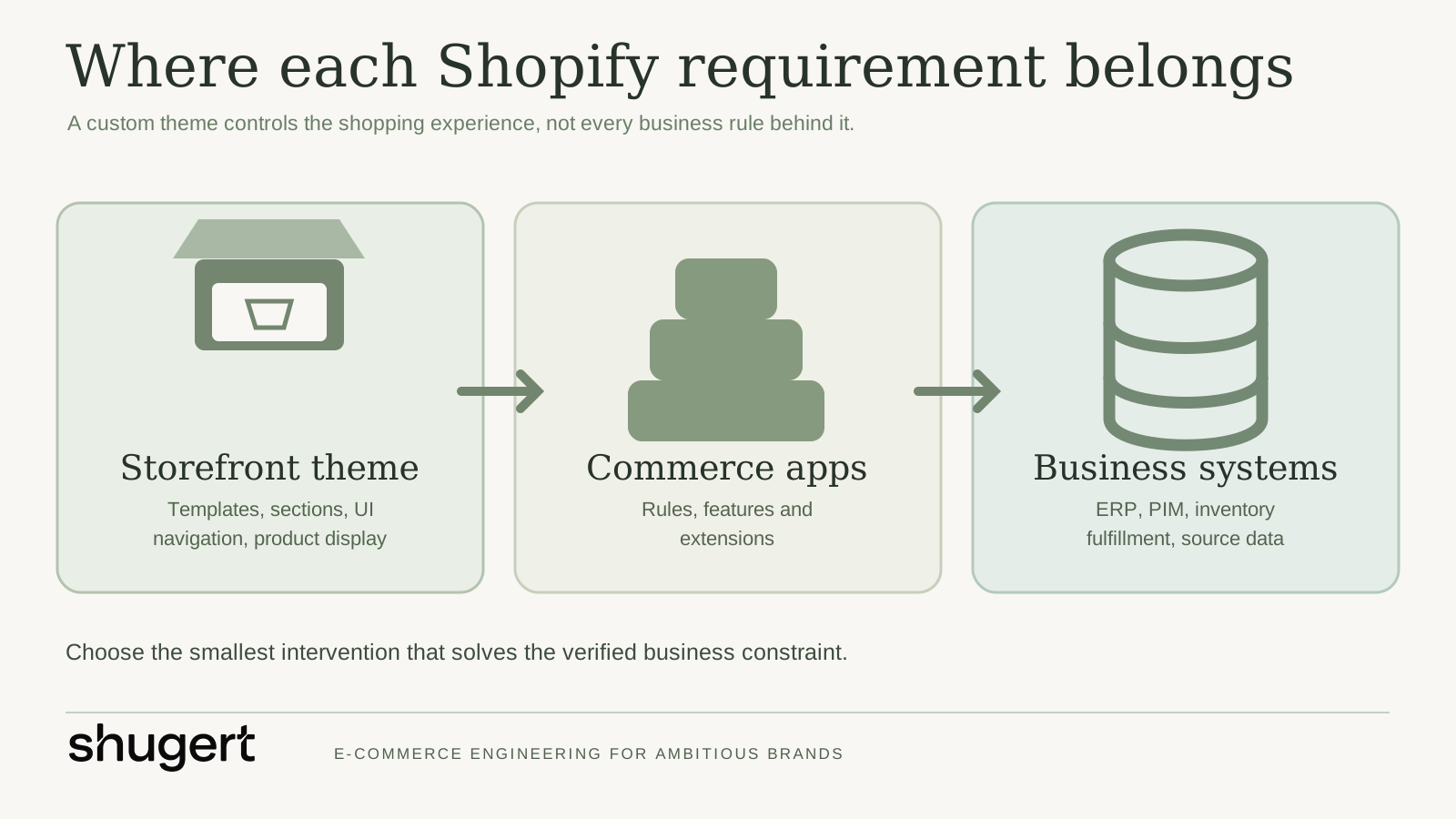
A Shopify theme controls much of the storefront presentation and shopping interaction. It does not, by itself, replace inventory logic, an ERP connection or a checkout extension. Separate the problem before committing to a rebuild.
Route | Choose it when | Typical scope | Main trade-off |
|---|---|---|---|
Configure the current theme | The existing templates work and the gap is content, navigation or merchandising | Theme settings, templates and content | Least disruption, but limited by existing components |
Customize a maintained theme | The design system is close, but a few customer journeys need distinct sections or interactions | New sections, templates, styles and focused code changes | Faster than a rebuild, but inherited architecture can constrain changes |
Build a custom Shopify theme | Repeated workarounds, inconsistent templates or performance debt make the present foundation expensive to maintain | New component system, templates, content model and QA | Greater design control, with more build and maintenance responsibility |
Build or integrate an app | Business rules, data exchange or account functionality sit outside presentation | App configuration, APIs, integration and monitoring | Solves operational needs, but requires separate ownership and support |
Audit the pages where shoppers drop off, templates that take too long to publish, scripts that create latency and requests that require manual operations. If the problem is limited to a campaign landing page, rebuild that experience first. If the same constraints recur across product, collection and account journeys, custom Shopify theme development may justify the larger investment.
Signs the current foundation is holding you back
- Every merchandising change requires a developer because sections cannot be reused safely.
- A patchwork of apps and injected scripts slows key shopping pages or creates conflicting interfaces.
- Product information cannot be presented clearly across variations, bundles or customer groups.
- Mobile navigation, search and product discovery do not match how customers shop.
- The team cannot change templates without risking another journey or losing SEO-critical content.
These symptoms warrant investigation; they do not prove that a new theme will increase conversion. Identify the cause, the affected customer journey and the expected business outcome before assigning development work.
Scope the Shopify project before design begins
Write down what must change and how the team will know it worked. A homepage mockup cannot settle whether the catalog, B2B pricing or fulfillment flow can support the design.
- Set a baseline. Record conversion by device and landing-page type, key page speed measures, organic landing pages, search behavior and support issues. Segment by customer type if DTC and B2B journeys differ.
- Map the journeys. Trace discovery, product selection, cart, checkout and post-purchase for the customer groups that matter. Capture points where a real shopper needs unavailable product or delivery information.
- Inventory the dependencies. List apps, pixels, feeds, ERP or PIM connections, subscriptions, shipping logic and the people who own them. Mark what appears in the theme versus what comes from another system.
- Define a content model. Specify what editors can control in sections, blocks, metafields and templates. Decide which content must be reusable and which needs guardrails.
- Write acceptance criteria. For each change, describe the expected behavior on mobile and desktop, the content owner, accessibility requirements and how it will be tested.
A usable Shopify development plan names the required templates and integrations, dependencies, owners, test cases and release window. It also lists exclusions. “Custom checkout” belongs outside the theme scope; “sync customer-specific pricing” needs a data and application design before anyone draws a price component.
A practical scope example
Suppose a B2B store wants customer-specific catalogs. The theme can render the right product information and account cues. The team still needs to define where access and pricing rules live, how customers are identified, what a logged-out visitor sees and how orders reach the back office. Test an eligible buyer, an ineligible buyer and an interrupted integration. The product page alone cannot settle those cases.
How custom Shopify theme development works
Creating a Shopify theme requires a design system and an implementation plan. Shoppers need consistent interactions, and the commerce team needs components it can edit without breaking the site.
Design the system around real shopping tasks
Start with the journeys and catalog structure, then define typography, spacing, responsive behavior, navigation, product information and reusable page patterns. Review edge cases early: long product names, sold-out variants, promotion overlaps, sparse images and translated copy. Design reviews should include the people who publish campaigns and support customers, not only stakeholders who approve visual direction.
Build components that editors can actually maintain
A Shopify custom theme commonly uses templates and reusable sections with configurable blocks. The development team should decide which patterns are global, which settings belong to a template and which values belong in product or customer data. Specify defaults, limits and fallback behavior for each component. Dozens of ambiguous editor controls leave the merchandising team to manage the complexity.
Shopify documents sections, blocks, and JSON templates. Use these supported primitives to keep merchandising changes in the editor rather than hard-coded in templates.
For implementation patterns, see theme architecture patterns.
The Shopify developer work should use version-controlled code, a repeatable development environment, code review and a documented route to release. Ask for ownership of the repository and a handover explaining how to update components and where integration-dependent behavior lives.
For a custom build, approve the content model and designs first. Implement a representative product and collection template, validate both against real catalog data, then extend the components to the remaining templates. Preview changes on an unpublished theme and review editorial controls with their users. Allow time to fix problems before the architecture spreads across the store.
Keep apps and business logic at the right boundary
Shopify custom app development makes sense when the store needs business logic, private workflows or system connections outside the theme. See whether a supported app can meet the requirement through configuration first. For a custom app, document its data flow, failure handling, permissions and support owner. A pricing or fulfillment rule belongs in the system that governs it, even when shoppers encounter the result on a product page.
Use custom Shopify app development as a separate workstream when the workflow needs its own lifecycle.
An effective Shopify implementation connects storefront behavior to the operational system behind it. If stock, customer eligibility or shipping promises originate elsewhere, define the source of truth and what the shopper sees when that source is unavailable.
Treat speed, accessibility and SEO as acceptance criteria
Measure key page types before the build and repeat the measurements before launch. Follow Shopify theme performance best practices and run Theme Check in the development workflow. Keep image sizes, unused scripts, app embeds and layout shifts in view. Test on mobile conditions as well as a desktop preview, and include keyboard navigation, focus states, form errors and readable labels in QA.
For SEO, preserve valuable page intent, crawlable navigation, headings, product content and relevant structured data. Verify canonical URLs, indexation directives, product and breadcrumb schema, and international URLs where Markets is used. If URLs change, map old pages to their closest new equivalents. A theme redesign is a poor reason to erase content that already brings qualified visitors to the store.
Plan separately for Shopify Plus and B2B
Shopify Plus development may involve checkout, accounts, B2B purchasing, multiple markets and system integrations. Scope each requirement separately from the theme so the design does not hide unfinished commercial work.
Requirement | Storefront theme responsibility | Additional work to scope |
|---|---|---|
Company buyer journey | Show appropriate navigation, product details and buying cues | Customer identity, catalog access, price rules and account permissions |
Checkout changes | Pass clear product and cart context into checkout | Supported checkout extension approach and eligibility for the store's plan |
ERP or PIM data | Display usable, accurate product and availability information | Mapping, sync frequency, error handling and ownership of source data |
International or multiple storefronts | Present localized content and sensible navigation | Markets, currency, language, tax, fulfillment and content governance |
For a Plus project, ask which requirements are native platform configuration, which need extensions, which need apps and which belong in external systems. Get a working demonstration of the highest-risk buyer journey before committing to a full visual build.
If checkout is in scope, define it against the Shopify checkout extensibility options rather than assuming a theme can change checkout behavior.
A practical 2027 decision checklist
Use these questions before approving a custom-theme statement of work. A new calendar year does not automatically justify a rebuild, and Shopify platform capabilities can change; check the current documentation while scoping.
- Is this genuinely a theme problem? Identify the template, interaction or editorial workflow that cannot be solved safely with theme configuration or a focused section.
- Do you need a fresh design system or just new components? Compare the maintainability and upgrade cost of each approach, not only the initial quote.
- Where will commerce rules live? Keep customer eligibility, B2B rules, fulfillment decisions and ERP data in the systems that enforce them.
- Can a merchant edit the result? Require demonstrations of the editor controls, section presets and content fallbacks before launch.
- How will you prove improvement? Baseline page speed, mobile journeys, conversion segmentation, publishing effort and SEO performance before the first commit.
- What is the release and rollback plan? Specify unpublished-theme previews, change freeze, QA sign-off and integration mitigation for critical flows.
For an implementation-oriented companion, review our Liquid template best practices and Shopify theme architecture patterns. For commercial scope, compare Shopify development services and ongoing engineering retainers.
Test, migrate and release without unnecessary risk
Use actual products, discounts, customer states and order paths for launch testing. A preview alone cannot show whether orders reach the right systems.
- Functional QA: Test product variants, search, filters, cart changes, forms, discounts and app interactions.
- Commercial QA: Test tax and shipping scenarios, payment paths, customer-specific rules and order handoff to downstream systems.
- Content and SEO QA: Compare templates, metadata, internal navigation, redirects and high-value landing pages against the old store.
- Experience QA: Test mobile breakpoints, accessibility, page weight and the flows most likely to affect revenue.
- Operational QA: Confirm who watches errors after launch, how issues are escalated and how changes can be reverted.
For a migration, sign off on data movement separately from design. Reconcile products, customers, orders where applicable, and business-specific fields before cutover. Prepare a redirect map and freeze conflicting changes during the release window. Identify a rollback or mitigation path for each critical integration. If the architecture allows a phased release by template or feature, agree on monitoring and stop conditions in advance.
Use a migration launch QA checklist to assign sign-off across commerce, operations and engineering.
Choose a Shopify development company that can own the outcome
A Shopify theme development agency should explain why a theme change is the right intervention and what it will build. Ask the delivery leads to walk through a recent complex project: a constraint they faced, a trade-off they made and what happened after launch.
Ask the partner | A useful answer includes |
|---|---|
What would you investigate before proposing a rebuild? | A baseline, affected journeys, code and app audit, and a decision between fixes and replacement |
Who owns design, engineering, QA and releases? | Named responsibilities, review points and a clear escalation path |
How will you separate theme, app and integration work? | A system map, source-of-truth decisions and explicit acceptance tests |
How do you protect SEO and conversion during migration? | URL mapping, content inventory, prelaunch comparison and postlaunch monitoring |
What will our team own afterward? | Repository access, editor documentation, support boundaries and a backlog for improvements |
Page count tells you little about the cost of this work. Unique templates, state-dependent experiences, integration dependencies, migration risk and testing depth all affect effort. Ask for a phased estimate with assumptions and change-control rules. A Shopify store developer or Shopify web developer should be able to describe testing and handover as clearly as the design.
The Shopify development cost guide can help structure a budget conversation around scope.
Treat a proposal for a complete redesign cautiously if the team has not seen the current theme, app footprint or operational dependencies. The statement of work should separate discovery, design, implementation and release, name deliverables at each gate and explain how scope changes are priced. Ask who reviews the code and signs off on launch; the sales lead may not remain involved.
Shugert Marketing works as a senior-led Shopify delivery partner for established DTC and B2B teams. Its scope can connect technical SEO, conversion priorities and storefront performance to custom themes, commerce workflows, integrations and migrations, with controlled releases and ongoing embedded delivery. That is a fit when the hard part is coordinating the storefront and systems over time; a small, isolated visual change may not need an embedded team.
Conclusion
Build a custom Shopify theme when the current foundation repeatedly blocks measurable customer and merchandising needs. Start with evidence, separate theme tasks from app and integration tasks, and put QA and release ownership in the contract. If your store needs a more maintainable storefront and dependable delivery across the systems behind it, discuss the roadmap with Shugert Marketing or request a scoped proposal.
Ship complex Shopify builds without breaking the store
Fashionable Inc. has relied on us for more than six years across three Shopify Plus stores. Read the case study
Most quotes returned within 1 business day
FAQ
Is the Shopify dev store free?
Shopify provides development stores for building and testing before a merchant takes over. A development store is not a substitute for a scoped production release: plan separately for any paid apps, integrations and ongoing store costs.
What are Shopify development services?
Shopify development services include store implementation, theme customization or a custom build, app work, integrations, migration and ongoing optimization. The right scope depends on whether the problem sits in the storefront, the business workflow or both.
How much does it cost to hire a Shopify developer?
There is no useful single price for every Shopify project. A focused theme change and a migration with B2B pricing, integrations and release support have different scopes; request a phased estimate with assumptions, acceptance criteria and postlaunch ownership.