How to 301 Redirect Old URLs Without Losing Traffic
Learn how to 301 redirect old URLs in Shopify, WooCommerce, Magento and Apache, plus mapping rules, redirect chain fixes and post-launch checks.
The cutover is booked for a Thursday night. Somewhere in a shared drive sits a redirect spreadsheet with a few thousand rows, three people have edited it, and nobody can say with confidence which of those rows puts a shopper on the right product page in the new store. The theme is ready. The data is staged. The URLs are the loose end.
That loose end is where traffic leaks after a replatform. Not in the design, and rarely in the catalog, but in the gap between an old path that used to work and a new one that doesn't. Getting how to 301 redirect right is mostly about deciding, URL by URL, what the closest equivalent page is.
Planning a replatform? Our Shopify migration service moves products, customers, orders and redirects as one SEO-safe scope.
Table of Contents
- What a 301 Redirect Does and When to Use It
- How to Map Old URLs to the Right New Destinations
- How to Create a 301 Redirect Step by Step
- Where to Set Up Redirects on Each Platform
- Redirect Chains, Loops and Conflicts to Fix
- How to Verify Redirects After Launch
- Request a Migration Scope Before You Switch DNS
What a 301 Redirect Does and When to Use It
The morning after a replatform, a link that worked for three years returns a bare 404. The product still exists. The old category path doesn't. A shopper who came from a paid ad or a supplier's referral link sees an error page, and the session is gone.
A 301 redirect is the HTTP status code for Moved Permanently. It tells browsers, crawlers and other clients that an old URL has been assigned a new permanent address and that future references should use the replacement, with the destination carried in the response's Location header, per the HTTP semantics standard in RFC 9110.
The status code belongs to the 3xx family, which means the request isn't finished until the client takes another step. That's why a redirect is a server response, not a property of a product record. It's a rule attached to a path.
Keep this decision table next to the mapping file:
| Status code | Meaning | Use it when | Keeps request method |
|---|---|---|---|
| 301 | Moved Permanently | A product, collection, article or page has permanently moved | Not guaranteed; POST may become GET |
| 302 | Found (temporary) | The change is expected to be short-lived, such as a seasonal or stock-out page | Not guaranteed; POST may become GET |
| 307 | Temporary Redirect | A short-lived move where the same method and body must reach the new endpoint | Yes |
| 308 | Permanent Redirect | A permanent move where the same method and body must reach the new endpoint | Yes |
| 410 | Gone | A page was permanently removed and has no useful replacement | Not applicable |
The last column explains why 307 and 308 exist at all. HTTP/1.0 defined both 301 and 302 as method-preserving, early user agents disagreed about what to do with a redirected POST, and practice drifted toward converting it to GET. The method-preserving 307 was specified earlier, while RFC 7538 defined the permanent 308. These avoid method changes where preserving a request body matters.
The ecommerce rule of thumb is simple. A product, collection or article that moved permanently gets a 301. A sale page, a stock-out landing page or a seasonal swap gets a 302. A discontinued product with no meaningful substitute can return a 404 or 410 rather than redirecting irrelevantly; a Shopify storefront typically returns 404 unless another response is implemented by supported infrastructure. The logic is identical on Shopify, Magento, WooCommerce and BigCommerce. Only the place you enter the rule changes.
For a plain-language explanation to hand a marketing lead before the mapping review, how 301 redirects work covers the mechanics without the platform noise.
How to Map Old URLs to the Right New Destinations
The most expensive redirect mistake is also the cheapest to make: pointing every unmapped URL at the homepage. It satisfies a status-code check and fails the shopper. Someone searching for a specific dog food lands on a storefront with no idea which aisle to walk, and the search engine learns that the old URL's relevance belongs to a generic page.
A redirect that works but points at the wrong page is worse than a clean 410. The 410 tells everyone the item is gone. The bad redirect pretends the answer exists.
Start with the inventory, from three sources, not one:
- A full crawl of the legacy site catches every indexable path, including collections nobody has linked to in years.
- Every URL with clicks or impressions in Google Search Console catches pages the crawl may have missed and tells you which ones carry traffic.
- Every URL with backlinks in Ahrefs protects the pages holding link equity, which are often product or comparison pages a migration team would otherwise deprioritize.
Then define the new structure before mapping a single row. Shopify's architecture is flat: /products/, /collections/, /pages/, /blogs/. Once those destinations exist, every old URL has somewhere real to go. This is why the redirect map gets agreed before theme work begins, so templates are built around the mapping rather than retrofitted to it, a sequencing detail covered in the Shopify migration guide.
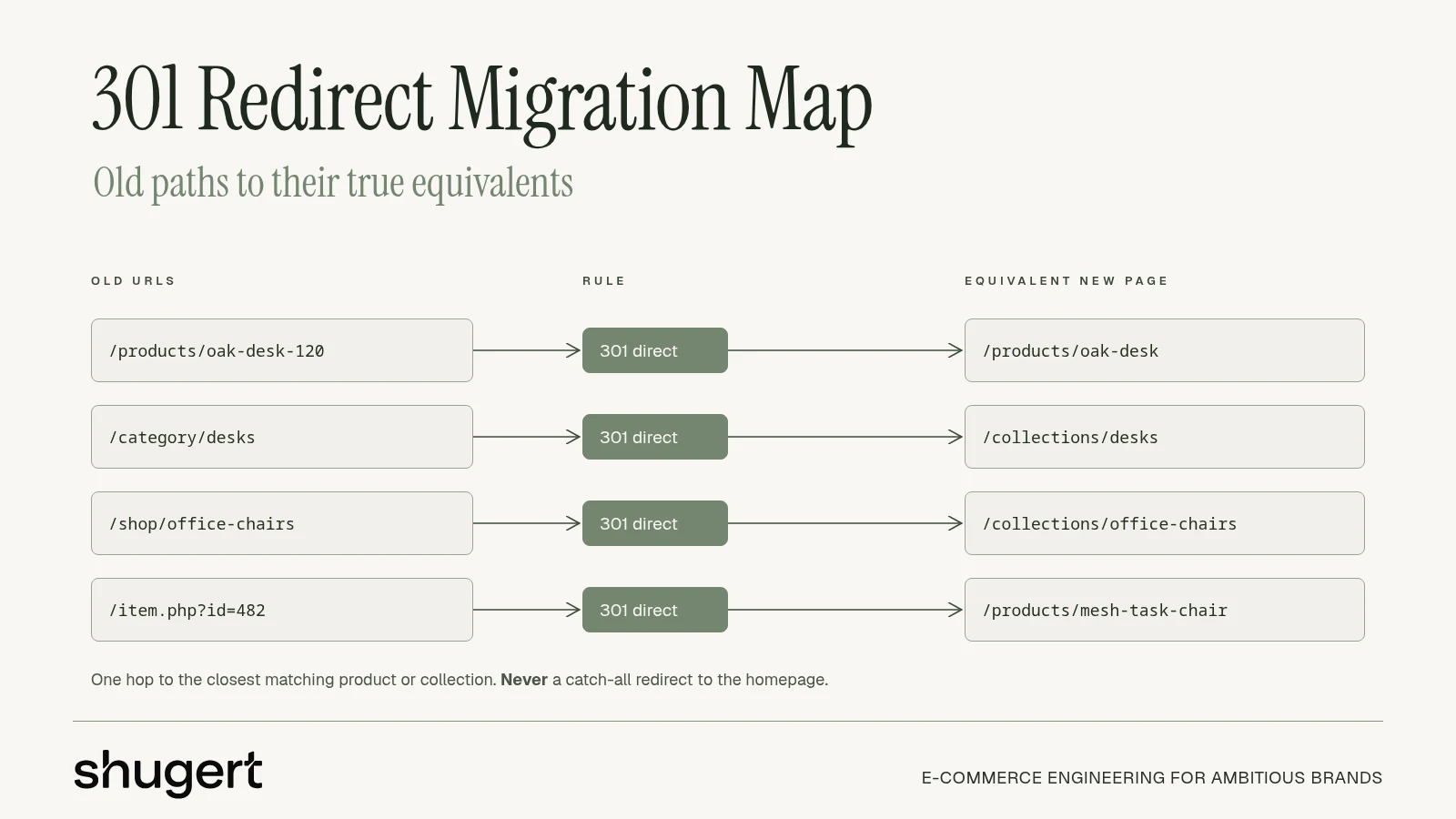
The mapping rules that survive contact with a real catalog
- One to one wherever an equivalent page exists. A product that survived keeps a dedicated destination.
- A retired product can redirect to the closest relevant replacement product or collection if it genuinely serves the same intent. Not the homepage, not the newest arrival, not a category three levels away.
- A page with nothing useful behind it should return an appropriate 404 or 410, rather than a misleading redirect. Shopify does not expose a general 410 setting in its built-in redirect interface. Pruning is a legitimate outcome, not a failure.
- Paginated, filtered, tag and parameterized URLs get an explicit decision each. A catch-all rule is how faceted URLs end up competing with canonical ones.
Magento makes this concrete. The same product is often served under several category paths, /dogs/food/product.html and /product.html among them, with category URLs nested several levels deep. Both path variants collapse into one /products/ destination on Shopify. WooCommerce has its own variants: /product-category/ archives, tag pages, and paginated URLs that each need a stated outcome. The wider inventory step, including how products and customers move alongside the URLs, is covered in the Shopify data migration breakdown.
Rank the list by value before mapping. URLs with external backlinks, paid ad and email landing pages, and top organic click earners get reviewed by hand. Those carry the most traffic and link equity, so a wrong destination costs the most there. Teams mapping multilingual or multi-region catalogues face an extra layer of path variants, and the replatforming SEO checklist from CIQRA covers the planning order for those catalogues.
The practical sequence for SEO continuity is inventory the valuable URLs, build the redirect map, validate canonicals and sitemaps, then monitor Google Search Console after launch. Google's guidance on 301 redirects treats this as foundational work rather than post-launch cleanup, and recommends implementing redirects and sitemap updates and then notifying Google so it crawls the new site and forwards signals. For a store with years of accumulated links, bookmarks, ad destinations and analytics history, that forwarding is the whole point of the exercise.
How to Create a 301 Redirect Step by Step
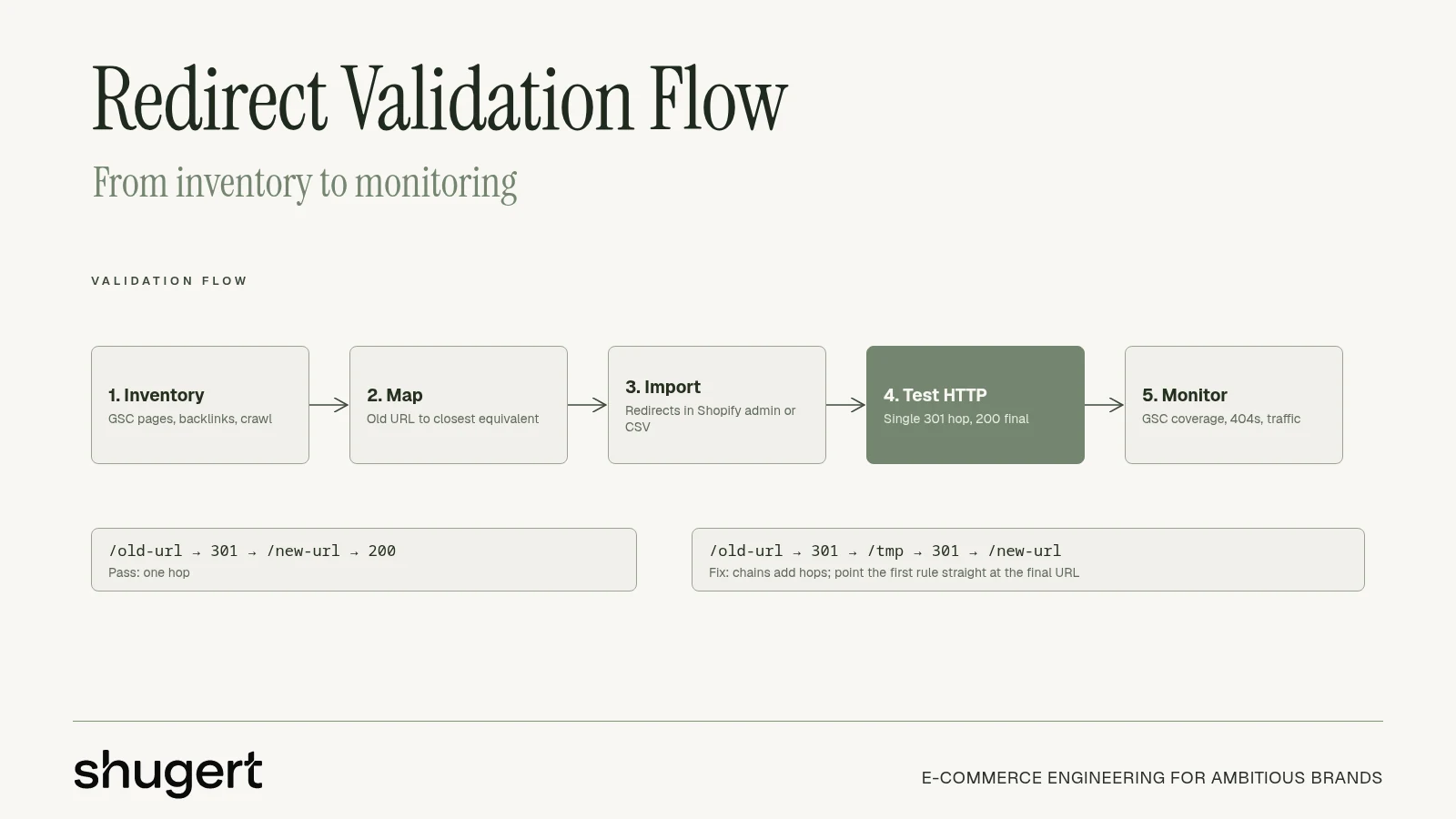
Follow the steps in order for every mapped URL, or at minimum for every URL in the top-value tier. The order matters because each step removes a failure mode the next one can't detect.
- Confirm the old URL and its current response. Crawl the legacy site and record each path's status code and final destination. A path that already redirects needs its chain rewritten, not a second rule stacked on top.
- Choose the destination that serves the same intent. The product page if the product survived, the collection if it didn't, the article if the content moved. Avoid routing product URLs to an irrelevant homepage; choose a meaningful replacement or an appropriate missing-page response.
- Write the rule in the platform's native format, using paths. On Apache that's a
Redirect 301 /old-path /new-pathline. On Nginx it's areturn 301. Keep http and https, and www and non-www variants in scope, because a rule covering one host form leaves the inbound links pointing at the other one untouched. - Clear the old path of live content. If a page, product or collection occupies the same handle in the new store, the redirect won't fire. Rename or unpublish the conflict, then retest.
- Test the actual HTTP response. Test the full GET redirect chain with
curl -sSL -o /dev/null -w '%{http_code} %{url_effective} %{num_redirects}' https://example.com/old-path. HEAD checks withcurl -Ican complement this but are not equivalent to GET. A pass looks like exactly one 301 followed by a 200 from the intended final URL. Two 3xx responses, a 404 at the end, or a 200 on a page that isn't the mapped destination all count as failures. - Re-crawl the full legacy list against staging. Automated, every URL, one pass. Anything that isn't a single hop to a 200 gets fixed before DNS moves.
- Repeat that crawl on production after deployment. Redirect behavior can differ between staging and live once caching, apps and DNS are in play. The live domain is the only place a final answer exists.
Step 5 is the one teams skip. A rule sitting in the admin panel proves nothing about coverage. Only the response proves it.
The other trap is scope. A blanket 301 applied across every path will catch checkout endpoints, form posts, webhooks, ERP callbacks and app routes along with the storefront URLs. MDN's documentation of the 301 status code notes that browsers and specifications have historically allowed a 301 to turn a redirected POST into a GET, and that 308 prevents the change.
Scoping rule: keep redirect rules on legacy storefront paths, exclude operational endpoints, and use 308 where the same method and request body must survive the move.
For a Shopify Plus build, that means app callbacks, admin routes and API paths stay out of the import file entirely. Redirect rules belong to the storefront, and nothing else.
Where to Set Up Redirects on Each Platform
The rule format changes platform to platform. The logic never does. What determines whether a migration is manageable is the bulk option: a store with four thousand legacy paths can't be handled one screen at a time.
| Platform | Where redirects live | Bulk option | Common setup issue |
|---|---|---|---|
| Apache | .htaccess or the virtual host configuration |
Multiple Redirect 301 lines or a rewrite map |
Rules conflict with existing rewrite rules |
| Nginx | Server or location block configuration |
Multiple return 301 rules in included map files |
Config reload needed before testing |
| WordPress with WooCommerce | Redirect plugin or server rules | CSV import in redirect plugins | Plugin rules override server rules without warning |
| Magento (Adobe Commerce) | URL Rewrites in the admin | Bulk automation via verified integration or script; do not assume native CSV import | Legacy category paths create several variants per product |
| Shopify | URL redirects in the admin | CSV with Redirect from and Redirect to paths | Redirect silently skipped when a live page uses the old path |
| BigCommerce | Redirect settings in the control panel | Plan on one-at-a-time entry unless a bulk import is confirmed in the control panel | Confirm the current menu and import options before planning |
On Shopify specifically, redirects live under Content > Menus > URL redirects, and bulk creation runs through a CSV with the old path in the Redirect from column and the destination in Redirect to, no full domain required for each source. That's confirmed in Shopify's URL redirect documentation, which is also the reason legacy URLs in a Shopify migration move through 301 redirects rather than any platform-specific mechanism.
The import sequence is the same everywhere: export crawlable URLs and analytics landing pages from the legacy store, normalize them into one source-to-destination file, strip duplicates, import, then crawl the storefront to confirm each source returns the expected permanent redirect.
Two platform-level cautions. On WordPress, check plugin and server layers separately after import, because plugin rules can override .htaccess without notification. On Magento, count the rewrite variants per product before importing, not after. Teams moving off either platform can compare path conventions in the Magento to Shopify walkthrough and the BigCommerce to Shopify notes. If a specific import routine keeps failing, the step-by-step guide to creating URL redirects in Shopify walks through the admin flow.
Redirect Chains, Loops and Conflicts to Fix
The redirect that looks correct in the admin and never fires is the one that costs a week. The rule is present, the destination is right, and the old URL still returns a 200 because something on the new storefront occupies the same path.
Shopify applies a URL redirect only when the old path no longer resolves to a live page. A leftover page, a product with a matching handle, or a collection created during testing will block the rule without any warning in the admin. As BulkFlow's notes on Shopify bulk redirects put it, a redirect list alone doesn't prove the old URL has been handled. Reserved and system paths add a second layer: legacy paths that collide with Shopify's product, collection, cart, order, app or filtering structures may not be redirectable through the normal feature at all.
A redirect can also fire exactly as configured and still be wrong. A rule that sends a discontinued product's URL to the homepage technically works, but the shopper loses the product context and the search engine sees a weak substitution. Mapping decides where equity and intent land; the server rule only executes that decision.
Diagnose by symptom rather than by inspecting rules one at a time:
| Symptom | Likely cause | Fix |
|---|---|---|
| Old URL returns 200 instead of redirecting | A live page or product still uses the old path | Remove or rename the conflicting page or handle, then retest |
| Redirect returns 302 or 307 | Temporary rule or default setting used for a permanent move | Change to a 301 for permanently moved content |
| Two or more hops before the final page | Legacy redirect imported on top of a new one | Point the original URL straight to the final destination |
| Redirect loop or timeout | Rule sends the URL back to itself or to a rule that reverses it | Remove the reversing rule and test the final URL |
| Form, checkout or webhook fails after a rule | Blanket 301 changed POST to GET | Exclude the endpoint or use 308 for method-preserving moves |
| Shoppers land on the homepage | Unmapped URLs sent to the homepage | Map to the closest collection, or return 410 if nothing replaces the page |
| Soft 404 at the destination | Target page is thin, empty or noindexed | Redirect to a relevant, indexable page |
Chains are the most common inheritance problem. Old redirects carried over from the legacy platform get imported on top of new ones, so a single request walks through two or three hops before arriving. Search engines will follow a chain of redirects, but every extra hop adds latency and some user agents handle long chains inconsistently, so keep each old URL to a single hop wherever possible.
Any URL that needs more than one hop gets rewritten to point directly at the final page. No exceptions for "it works anyway."
Some fixes take minutes, like renaming a conflicting handle. Others need a remapping pass, like rebuilding chains after a category restructure. Sort the crawl output by hop count and fix the deepest chains first, because those are the ones already degrading. Homepage catch-alls and self-referencing loops deserve the same priority: both pass a quick status check while sending buyers and crawlers somewhere the mapping never intended.
Shugert's Shopify migration engineering service covers legacy URL mapping, redirect validation and post-launch monitoring. The existing migration planning guide gives the broader cutover checklist.
How to Verify Redirects After Launch
Verification runs in two phases and reuses the crawl already built for the mapping work. Same URL list, same crawler, no new spreadsheet.
Before launch
Validate redirect behavior in production-equivalent routing. A development theme alone may not reproduce Shopify's domain-level URL redirect behavior. Every source URL should return a single 301 to a 200 page that is indexable and doesn't redirect again. Confirm the XML sitemap lists the new URLs and that canonicals point at final destinations rather than at anything that resolves through a hop. Anything returning a 200 on the old path (a live conflict), a 404, or a second redirect gets a ticket before DNS moves.
A 301 that resolves cleanly can still be wrong. Check that each destination is the mapped page, not just any page that loads: a redirect sending a discontinued product URL to the homepage returns a 200 and passes a status check while failing the mapping.
Launch day and the first month
Re-crawl the same list against the live domain on cutover day and clear anything that changed. Submit the updated XML sitemap in Search Console so Google recrawls the new URLs, and start watching coverage and performance daily for 404s, indexation changes and drops on the top commercial URLs, measured against the pre-migration baseline in clicks and impressions.
Practical rule: treat the first week as the critical window and 30 days as the minimum before calling a cutover stable. Baseline comparisons are the only honest measure of whether the mapping held.
Mapping errors surface in the first week: a traffic cliff on a specific template, or impressions transferring to the wrong page because a collection path was missed. Daily review catches both while the fix is still cheap. The technical SEO for Shopify resource covers the crawl, canonical and indexation checks that sit alongside redirect verification.
A mapped list plus a monitored cutover is what preserves traffic. The Llantas Cavazos migration moved a tire retailer's 8,000+ SKU catalog to Shopify with its fitment data and SEO continuity intact. That outcome came from the URL inventory, the mapping decisions and the daily monitoring, not from luck at cutover.
Request a Migration Scope Before You Switch DNS
The go or no-go rule is short. A redirect plan a team can run in house is a fit when the catalog is small, the platform carries no subscriptions or ERP links, and the legacy URL footprint is modest enough to review by hand.
Bring in a migration team when Shopify Plus features, B2B pricing, ERP or 3PL integrations, subscriptions, or a large legacy URL footprint mean a failed cutover costs more than the project. That tradeoff is the whole decision, and it's the one Shugert Marketing frames for brands before scope is set.
A proper migration scope includes the URL inventory from all three sources, the redirect map agreed before theme work begins, the full legacy crawl against staging and live, launch QA, and Search Console, analytics and order monitoring through the first 30 days after cutover. Migration and custom development projects at Shugert's Shopify migration practice start at $5,000 with timelines of 4 to 24 weeks, with scope, assumptions and acceptance criteria documented before work starts.
Send the current platform, the SKU count and the top 50 landing pages by organic clicks, and request a migration scope with a redirect map review attached to it.
Migrate without losing rankings
Llantas Cavazos moved 8,000+ SKUs in under 7.5 weeks and kept 90%+ of organic traffic in week one. Read the case study
Most quotes returned within 1 business day