Headless Commerce vs Traditional: When Each Makes Sense
Headless commerce vs traditional: compare cost, performance, control and risk, then decide whether to stay headless or move to native Shopify.
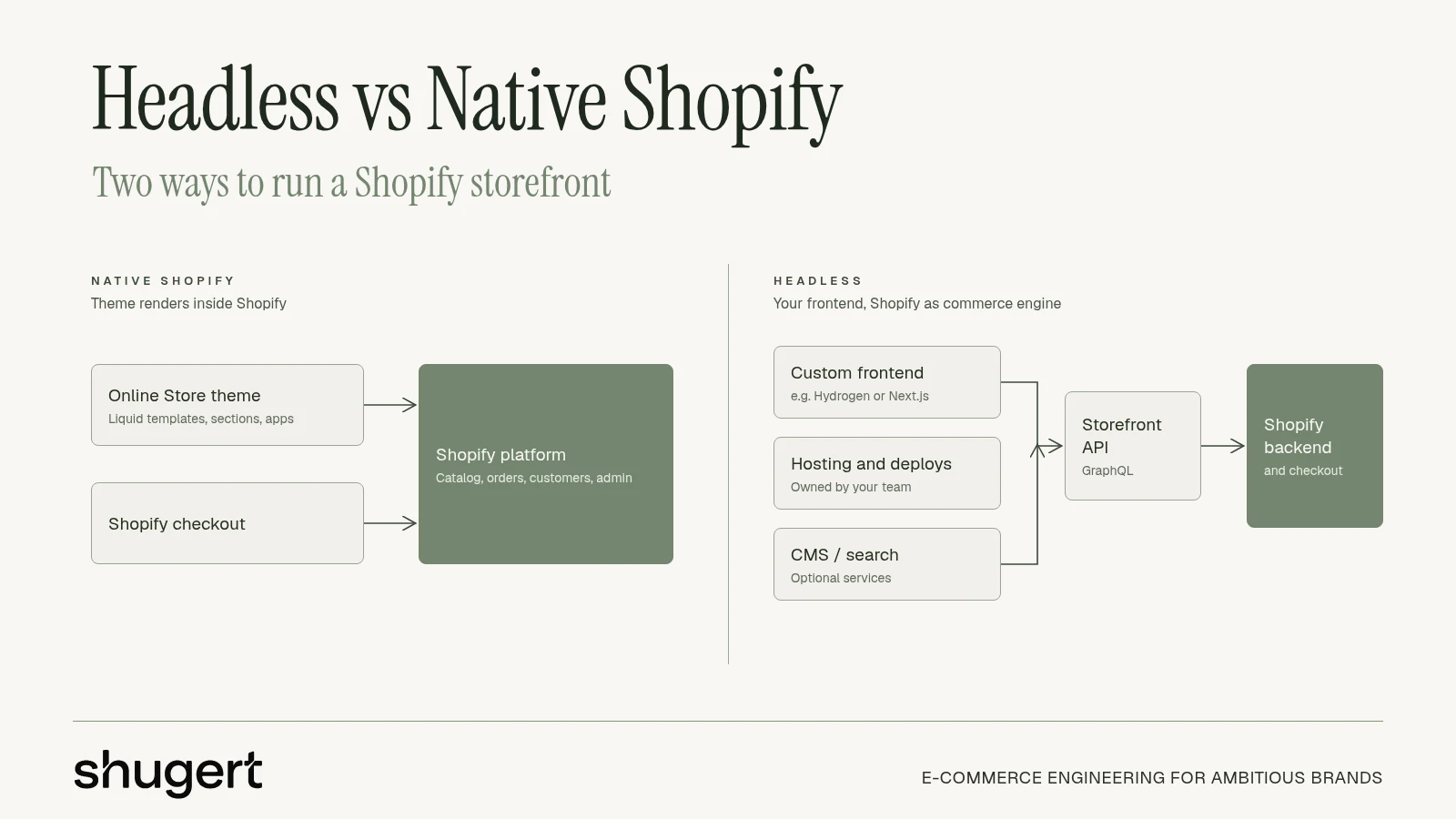
The popular advice is wrong: headless isn't the natural next step for a growing ecommerce brand. For most merchants, it means buying another application to maintain before proving that the existing storefront architecture is the problem.
The useful headless commerce vs traditional comparison starts with ownership, not design freedom. Which team makes routine changes, who fixes failed purchases, and what commercial return justifies the extra engineering?
Need this built properly? Our custom Shopify development team designs themes, apps and integrations as maintainable systems.
Table of Contents
- Headless and Traditional Commerce Side by Side
- Where the Work Moves When You Go Headless
- Performance Gains Depend on Build Quality
- What a Headless Build Costs After Launch
- Situations That Justify a Headless Build
- What You Gain and Give Up Moving Back to Native Shopify
- Choose Your Architecture Before You Scope a Migration
Headless and Traditional Commerce Side by Side
| Criterion | Traditional (native platform) | Headless |
|---|---|---|
| How the storefront is built | Platform theme inside one application | Separate frontend that calls commerce APIs |
| Who changes pages and content | Merchant team in the admin or theme editor | Developers for most template and page changes unless a separate CMS is in place |
| Apps and integrations | Installed and configured, most compatible apps work out of the box | Storefront-facing functionality integrated manually against the custom frontend |
| Performance levers | Theme code, apps, images and scripts | Rendering strategy, caching and JavaScript budget, plus the same app and image issues |
| Channels served | One storefront, plus native market settings and sales channels | Multiple frontends, such as web, mobile app and kiosk, from one backend |
| Hosting and maintenance | Platform plan, theme and apps | Frontend hosting, monitoring, release pipeline and regression testing |
| Team required | Merchant team with an optional agency | In-house engineers or a retained development team |
| Best fit | Most $1M to $10M DTC and B2B brands | Multi-frontend, shared-with-app or content-led businesses |
Traditional commerce keeps the storefront and commerce functions within a platform-controlled application. Headless separates the customer-facing frontend and connects it to the commerce backend through APIs.
That split changes the operating model more than the appearance of the store. A distinctive product page doesn't require a separate frontend application, and a native Shopify theme doesn't restrict a brand to an off-the-shelf design.
Compare operating responsibility, not screenshots
The decisive difference often appears after launch. Marketing needs a campaign page, merchandising needs a product template adjustment, and customer service needs a broken app fixed before another promotion begins.
With native Shopify, compatible theme sections and app blocks keep much of that work inside the admin. With headless, the quality of the CMS implementation and the availability of developers determine how independently those teams can operate.
Headless adoption isn't proof of commercial success. According to Alokai's November 2024 research, reported by Edmonds Commerce, 60% of retailers were adopting or planning headless within the following two years, but only 20% had live implementations.
Architecture popularity isn't a business case. A merchant needs a requirement, an owner and a return.
For brands in this revenue range, native Shopify should be the starting assumption. Headless is an exception the business must justify, not an upgrade that leadership approves because the architecture sounds more advanced.
Where the Work Moves When You Go Headless
A traditional platform resembles a restaurant kitchen serving its dining room. Headless resembles a central kitchen supplying a dining room, a delivery app and a catering operation from the same menu.
The second arrangement can support more experiences, but somebody must coordinate every destination.
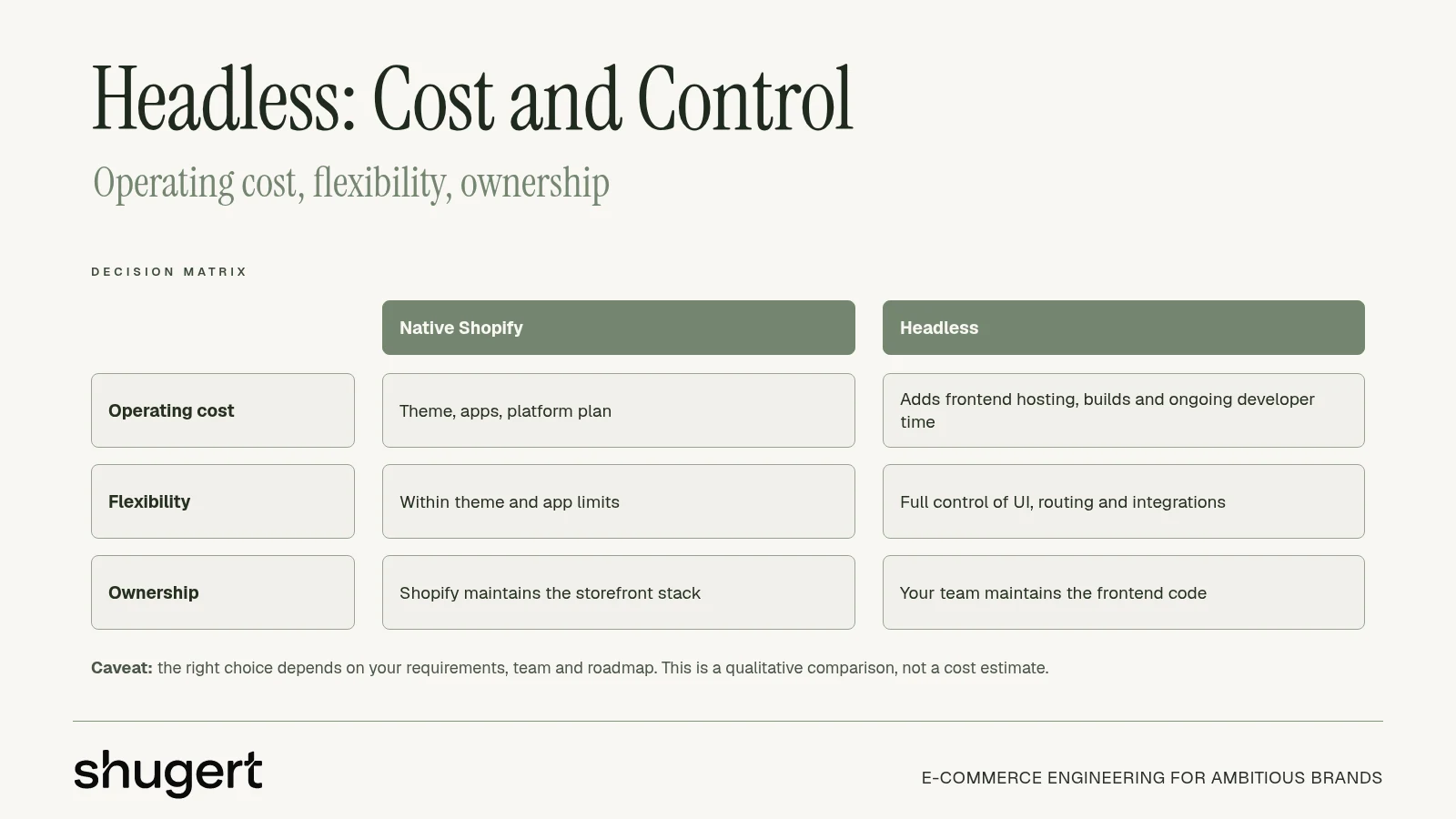
Shopify supplies products, collections, search, carts and contextual pricing through the Storefront API. The custom storefront hands buyers into checkout rather than independently rendering the complete checkout experience.
That boundary matters. Checkout extensions, subscriptions, discounts, customer accounts, analytics and ERP or PIM synchronization all need testing across the handoff, not just inside the product-page prototype.
Map the boundary before building
The Shopify Storefront API documentation sets a tokenless query-complexity ceiling of 1,000 and a maximum of 100 active storefront access tokens per shop. These are architecture inputs, especially when regional, B2B, mobile and campaign experiences share a shop.
For engineers planning cart behavior, CartBoss's Shopify cart API reference for developers provides useful implementation context. The project still needs explicit acceptance tests for cart persistence, buyer identity, discounts and checkout transitions.
A function inventory should identify where the code runs and who owns failures:
- Product discovery: Record whether search, filtering and recommendations belong to Shopify, an app or the custom application.
- Buyer context: Identify the source of market, currency, account and pricing information.
- Order handoff: Define what must survive between the cart and checkout, including attribution and subscription selections.
- Operations: Assign frontend hosting, deployment approvals, dependency updates, monitoring and regression testing to named people.
The brand owns these responsibilities for every custom storefront. A successful launch doesn't remove the need to investigate stale prices, expired sessions or broken content previews later.
Answer the ownership questions
Leadership should establish how many independently managed storefronts the business needs. Separate market content doesn't automatically require a separate application.
The technical lead should document exactly how much of the checkout path must be controlled and verify that Shopify supports it. Procurement should then confirm who will own releases and incidents after launch, including coverage when the original developer is unavailable.
If those answers remain vague, the architecture isn't ready to scope.
Performance Gains Depend on Build Quality
Speed is a common argument for headless, but architecture alone does not determine real-user performance. A custom frontend opens up efficient rendering and caching strategies, and it also adds API requests, client-side JavaScript, hydration work and a second application to monitor. Whether the net result is faster depends entirely on how well it is built.
Performance studies differ in sample composition and methodology; headline comparisons do not prove that either architecture is inherently faster. PageSpeed Matters reports median mobile LCP of 1.5 seconds for headless sites versus 2.4 seconds for traditional platforms. Crawl-based comparisons have also found Shopify stores rebuilt on Next.js losing their good Core Web Vitals passing rates after replatforming. Treat headless as a performance hypothesis, not a performance guarantee.
Test the delivered experience
Using p75 field metrics, the Adobe Core Web Vitals guidance identifies targets of LCP no higher than 2.5 seconds, INP no higher than 200 milliseconds, and CLS below 0.1.
| Metric | Good at p75 | Common cause of failure | Headless-specific risk |
|---|---|---|---|
| LCP, loading | 2.5 seconds or less | Oversized hero images, slow server response, render-blocking code | Client-side rendering delays meaningful content |
| INP, responsiveness | 200 milliseconds or less | Heavy JavaScript, third-party scripts, long hydration | Client bundles and hydration grow with custom components |
| CLS, stability | Below 0.1 | Late-loading apps, fonts and injected banners | Custom app markup shifts layouts without reserved space |
The Core Web Vitals benchmarks guide helps teams organize the baseline. Lighthouse is useful for diagnosis, but a clean lab run is not a substitute for real-user monitoring across devices and page types.
Make the proposal survive a falsification test
- Record the baseline. Capture LCP, INP, CLS, mobile conversion rate and revenue per session, segmented by template and device.
- Identify the actual constraint. Separate platform limitations from app scripts, oversized media, tag-manager additions and theme code. Most slow Shopify stores are slow because of what was added to them, not because of the platform.
- Optimize the existing implementation first. Remove unnecessary scripts, correct image delivery and fix rendering problems before funding a replacement.
- Prototype the alternatives. Compare native Shopify with the proposed headless approach using realistic content and integrations.
- Require production-like evidence. Test product, collection, cart and checkout-adjacent journeys with representative scripts, customer states and network conditions.
- Reject an unproven rebuild. Headless must demonstrate measurable value after implementation effort and operational complexity are counted. If the projected gain cannot pay back the build, the native theme wins.
Search visibility belongs in the same acceptance gate. Product, collection and content pages should return indexable HTML containing titles, canonicals, structured data and crawlable internal links without waiting for client-side JavaScript. The sitemap and redirect map must cover the old URL inventory before cutover.
A native theme starts with Shopify's URL and canonical conventions, though customizations still need review. A custom frontend requires explicit implementation and testing for every page type, which is one more line item the performance gain has to justify.
Targeted optimization often captures the useful improvement with less migration risk. For stores needing that baseline work, Shopify performance service scoped fixes start at $2,500.
What a Headless Build Costs After Launch
The launch invoice is the smallest number in a headless budget. The larger commitment is operating a storefront application alongside Shopify for years, including maintenance that produces no visible new feature.
| Cost item | Native Shopify | Headless build |
|---|---|---|
| Platform plan | Shopify plan fee | Shopify plan fee, with plan selection accounting for required API capacity |
| Frontend hosting | Included in the platform | Separately managed hosting, such as Oxygen or Vercel, billed as its own line item |
| Headless CMS license | Not required | Often required |
| Routine page and banner changes | Merchant team in the admin | Developer ticket and deploy unless CMS components support the change |
| App integration | Compatible apps installed through the app store | Storefront-facing functionality integrated by developers |
| Developer retainer | Optional, for new features and maintenance | Usually needed for application upkeep |
| Modeled three-year total, illustrative 2025 example | Baseline | $408,660 higher, as detailed in the cited model below |
An illustrative 2025 third-party comparison from Xerx estimated a three-year headless cost $408,660 higher than a traditional implementation; at 5,000 monthly orders and a $100 average order value, its assumptions required a 2.27% sales increase to break even.
Treat those figures as a stress test, not a forecast. Replace the model's assumptions with actual vendor proposals, staffing costs and contribution margins before presenting the case to leadership.
Build the payback model around contribution
The largest cost gap is usually developer capacity, not hosting. A cheap hosting invoice means nothing if routine merchandising work consumes the engineering backlog every sprint.
The Shopify development cost guide provides a useful framework for separating implementation scope from continuing ownership. The business case should include:
- People: Internal engineering salaries or agency retainers, plus coverage during absences.
- Integration upkeep: API changes, synchronization failures, app replacements and cross-system regression tests.
- Validation: Analytics reconciliation, SEO checks and release acceptance.
- Incident response: Monitoring, investigation, rollback and customer-service coordination.
- Commercial constraints: Unsupported checkout requirements, migration disruption and abandoned work.
- Opportunity cost: Roadmap items delayed because developers are maintaining the storefront instead.
The payback calculation is straightforward: implementation cost plus incremental operating cost, less credible operating savings, divided by incremental monthly contribution margin. Revenue alone is the wrong denominator because product costs, fulfillment, payment fees and returns still consume the additional sales.
Set the payback window before you price the build
Choose the recovery window the way you would for any capital project: a period leadership will defend, scaled to your contribution margin. A store with thin margins needs a shorter window than one keeping a large share of each additional order. If the model cannot pay back inside that window under conservative assumptions, the architecture has not earned its cost.
Faster experimentation, international experiences, B2B pricing and unusual frontend requirements each deserve a separate scenario. Bundling them into one optimistic conversion forecast is how weak business cases get approved.
Investment rule: Unpriced developer time is still a cost. Unmeasured flexibility isn't a return.
Run the same discipline in reverse. If a complex headless store can reduce release coordination and support work on native Shopify without losing material revenue, removing the custom layer may be the better investment. A native theme wins whenever the headless layer adds engineering cost without a meaningful UX, content or channel advantage.
Situations That Justify a Headless Build
For many brands with a single established storefront and standard merchandising needs, native Shopify is the lower-complexity starting point. Revenue alone does not determine architecture. Headless requires a specific capability that a theme cannot deliver efficiently, not just a general desire for speed or originality.
| Situation | Better fit | Main reason |
|---|---|---|
| One storefront, one market, standard merchandising | Native Shopify | Lower operating load and compatible apps work out of the box |
| Several brands, regions or storefronts on Shopify Plus | Headless may fit | Plus capacity supports multiple experiences, but each needs its own operations |
| Shared commerce logic with a native mobile app | Headless may fit | One backend serves both the app and web storefront |
| Commerce is a small part of a large content site | Headless may fit | The content platform owns the frontend |
| Slow pages caused mainly by apps, scripts or images | Native Shopify with targeted fixes | Those causes don't establish a platform limitation |
| Wants design freedom without in-house engineers | Native Shopify | Merchant-editable sections avoid routine developer tickets |
Separate capacity from justification
The Shopify Plus plan comparison lists up to 25 headless storefronts for Plus, while other plans list one. That capacity matters for regional, brand or channel experiences, but it isn't a delivered implementation.
Each storefront still needs deployment, observability, SEO controls, analytics validation, content governance and release management. A licensing allowance doesn't provide the people or processes to run it.
The strongest reasons for headless are narrower than most sales presentations suggest. A frontend may need to coordinate several commerce backends, support markets with distinct content structures, or share an app-like experience with a native mobile application.
Another defensible case is a substantial publishing platform where commerce is a small component. Forcing that entire site into a commerce theme may create more work than integrating Shopify into the existing content architecture.
Apply the publisher and owner test
Headless can simplify publishing when in-house engineers already maintain reusable CMS components across a website, mobile app and in-store screens. Editors can publish approved content to those destinations without separately rebuilding each experience.
That benefit requires an established workflow. Purchasing a CMS doesn't automatically provide previews, scheduling, localization, accessible components or safeguards against broken layouts.
A custom frontend earns its place when it solves a valuable constraint that the native storefront cannot reasonably solve.
A well-built Online Store 2.0 theme delivers strong performance, custom design within Shopify's architecture and merchant-editable sections. When a headless layer adds engineering cost without a meaningful UX, content or channel advantage, the native theme is the better option.
B2B status alone doesn't change that recommendation. Account pricing, buyer permissions and ordering workflows should be evaluated against Shopify's supported capabilities before anyone assumes that wholesale requires a custom frontend.
What You Gain and Give Up Moving Back to Native Shopify
Some merchants move from headless back to native Shopify when routine merchandising depends on developers. Landing pages, product template adjustments, promotional banners and app installations each consume engineering time because the storefront lives outside Shopify.
Replace developer-dependent merchandising
A native implementation returns routine publishing to the theme editor. The merchant team can use supported sections, install compatible apps and launch campaigns without deploying a storefront application.
That doesn't make every change no-code. A new interaction, specialized integration or unsupported layout can still require development, but routine merchandising stops competing with application maintenance for engineering attention.
The gains are operational:
- Content ownership: Merchandisers manage supported page layouts and campaign assets inside Shopify.
- Campaign execution: Marketing works within approved components rather than requesting a new frontend release.
- Simpler coordination: The team removes a separate storefront deployment from routine updates.
- App compatibility: Theme-compatible storefront features can use their supported installation paths.
The trade-off is genuine. Moving back means giving up unrestricted frontend design outside Shopify's theme architecture, including interactions and page structures that don't fit the selected implementation. That freedom only has value when the team uses it. Apply the same payback test used to justify headless in the first place: capability that never ships is a cost, and cost that produces no return argues for the simpler architecture.
Rebuild behavior, not just the catalog
A migration isn't a product export followed by a theme installation. Promotions, shipping zones, tax settings, theme behavior, navigation and merchandising rules must be rebuilt and checked on Shopify.
Data, redirects, analytics and storefront behavior move together, whether the source is headless, WooCommerce or Magento. Otherwise, a technically successful catalog import can still leave customers with broken links, incorrect offers or missing attribution.
For a full-catalog reference, Llantas Cavazos's Shopify migration involved a tire retailer with 8,000+ SKUs. Catalog size is a migration-planning concern, not proof that a merchant needs headless.
Acceptance testing should follow real buying tasks: finding the correct product, choosing a variant, applying an eligible offer and completing an order under the right shipping and tax rules. Analytics should confirm those actions rather than merely firing a page-view event.
The trade is worth making when the surrendered freedom wasn't producing commercial value. Native Shopify should keep the capabilities that sell and eliminate the engineering obligations that don't.
Choose Your Architecture Before You Scope a Migration
A migration scope should follow an architecture decision, not conceal one. Leadership and engineering should complete this checklist before comparing implementation proposals:
- Count the required experiences. Document storefronts, markets and catalogs, separating committed requirements from possible expansion.
- Identify must-survive integrations. Include ERP, PIM, 3PL, subscriptions, search and other systems that affect orders or fulfillment.
- Specify buyer requirements. Record checkout, customer-account, B2B approval and pricing behavior using concrete purchase scenarios.
- Name release owners. Identify the engineers responsible after launch, or explicitly choose an operating model that doesn't require an internal application team.
- Capture the baseline. Preserve current Core Web Vitals, conversion and revenue-per-session measurements before redesign work changes the comparison.
- Approve the economics. Confirm that the proposal clears the contribution-margin payback window, including ongoing maintenance and migration risk.
Next Point Digital's guidance on mapping must-have features before demos is useful at this stage. Written requirements help teams distinguish a supported capability from a polished demonstration.
Scope the whole cutover
If the answers favor native Shopify, the next step is a migration scope, not another architecture presentation. Shugert Marketing's migration plan covers the storefront rebuild, data migration, redirects, technical SEO, analytics and integrations in one launch plan.
The Shopify migration service is relevant when those workstreams need coordinated delivery. The Shopify migration guide helps merchant teams prepare source-system access, catalog rules, URL inventories and launch dependencies.
Migration and custom development cost and timeline depend on source-system complexity, technical SEO exposure, integrations and acceptance requirements. Scope, assumptions and acceptance criteria are documented before work starts; those starting terms aren't a universal budget for a headless implementation.
Match delivery support to cutover risk
Shugert Marketing recommends a migration agency when Shopify Plus, B2B, ERP or 3PL integrations, subscriptions or a large legacy URL footprint mean a failed cutover costs more than the project. The relevant question isn't whether an internal team can import products, but whether it can validate the entire operating business before traffic moves.
The launch plan should assign responsibility for final data synchronization, redirect deployment, order reconciliation, analytics checks and rollback decisions. A storefront shouldn't launch merely because its pages look finished.
For a broader technical comparison, see the scalable ecommerce platform guide. This article concentrates on operating ownership and payback: headless should survive a requirement test, a performance test and a payback test. When it doesn't, native Shopify is the disciplined engineering choice.
Merchants can request a migration scope with their storefront count, must-survive integrations and target launch window.
Ship complex Shopify builds without breaking the store
Fashionable Inc. has relied on us for more than six years across three Shopify Plus stores. Read the case study
Most quotes returned within 1 business day