B2B Wholesale Platform: How to Choose One
Choose a B2B wholesale platform by buying pattern: Shopify Plus catalogs and terms, or custom quoting when the cart is not how the trade orders.
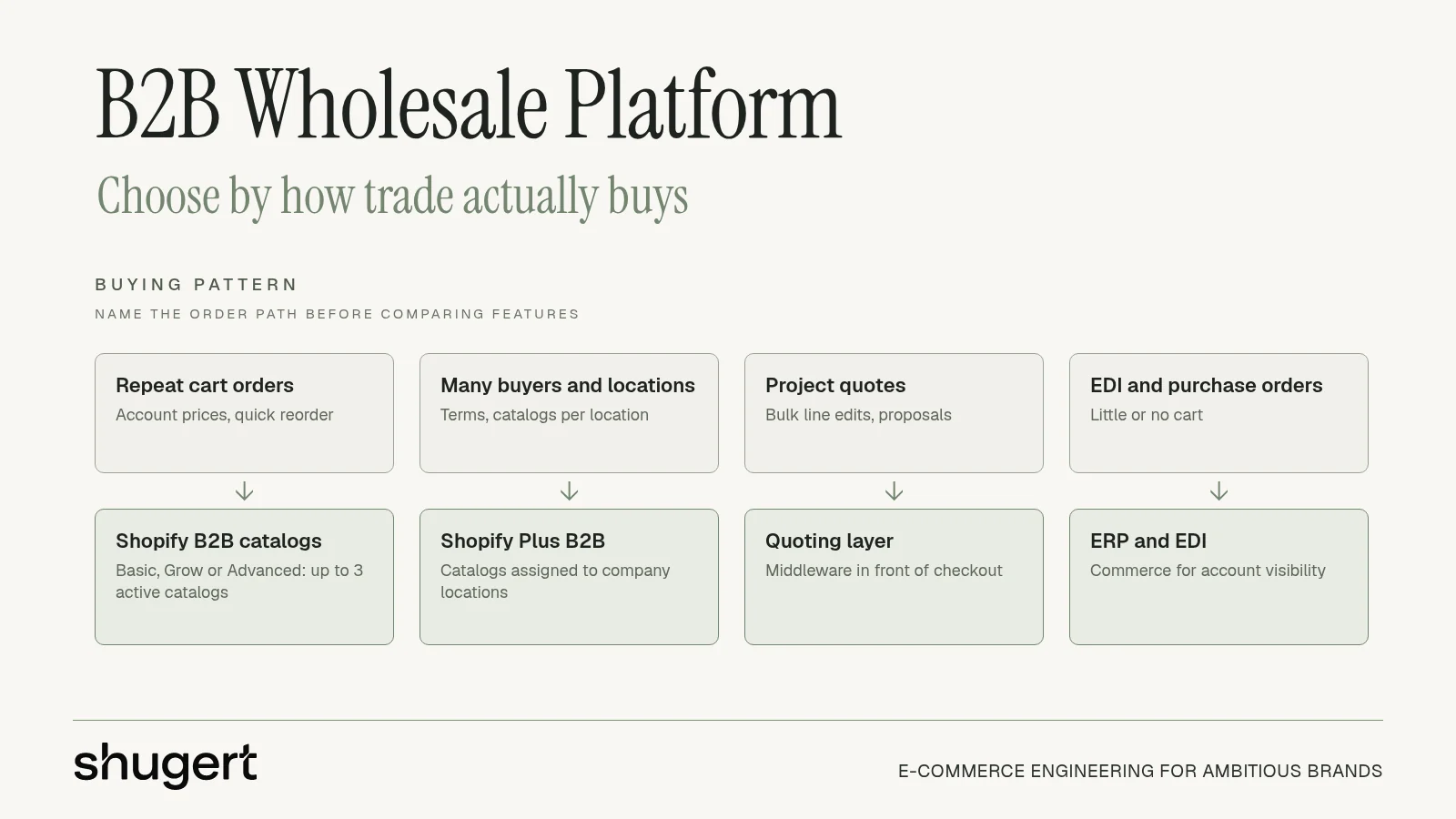
Picture a specifier forwarding a twelve-line furniture proposal where line seven matches neither the ERP, the spreadsheet, nor the price the rep quoted last month. That mismatch is the wholesale replatform problem for directors at brands doing $1M to $10M+ on WooCommerce, Magento, BigCommerce, or a headless stack. A B2B wholesale platform is not a prettier cart. It is the system that has to follow how trade orders.
Most of those buyers do not shop like consumers. Designers configure pieces, park them on a project, edit lines in bulk, and send a proposal to their own client. Replenishment accounts want last month's quantities at a contract price. EDI partners never open a storefront. Name that dominant path before anyone compares themes or app lists. Shopify B2B on a non-Plus plan, Shopify Plus, or quoting middleware is a phase decision, not a feature contest.
Need this built properly? Our custom Shopify development team designs themes, apps and integrations as maintainable systems.
Key Takeaways
- Shopify B2B is available on the Basic, Grow, Advanced and Plus plans. Non-Plus plans are limited to 3 active B2B catalogs across all B2B markets.
- Shopify Plus adds catalogs assigned directly to company locations (up to 25 per location), plus Plus-only features such as customer-specific deposits and partial payments.
- Quote-led trade needs a quoting layer. Native checkout does not replace configure-price-quote logic on any plan.
- Pick one price book, usually the ERP, before build starts. Most wholesale launches fail on data ownership, not design.
Table of Contents
- Match the Platform to How Trade Buys
- Account Prices Catalogs and Plan Limits
- When Shopify Plus Fits Wholesale
- How an Order Moves Across Systems
- Quote Workflows and a Catalog That Syncs
- One Price Book Before You Launch
- Request a Migration Scope for Wholesale
Match the Platform to How Trade Buys
Consider a furniture brand that sells mostly through interior designers and specifiers. Those buyers configure products, save them to projects, edit lines in bulk, and send polished multi-line proposals to their own clients. Trade accounts and homeowners need to see different prices, and the quote workflow matters more than checkout. Wholesale buyers rarely buy like consumers, so the platform has to fit the order path, not the other way around.
Name the dominant path before shopping features. The table below is the short list.
| Buying pattern | Platform fit | Rule it out when |
|---|---|---|
| Repeat cart orders at account prices | Shopify B2B on Basic, Grow, or Advanced for up to 3 shared catalogs, or Shopify Plus when accounts and catalogs multiply | Most orders are configured quotes, or the ERP calculates every price at order time |
| Companies with multiple buyers, locations, catalogs, and payment terms on the same store as DTC | Shopify Plus B2B, with catalogs assigned to company locations | You need more than three active catalogs and you are not on Plus, or one location would need more than 25 catalogs |
| Project quotes, bulk line edits, and proposals sent to the buyer's own client | Custom quoting or middleware in front of the commerce platform | You expect native checkout to replace configure-price-quote logic |
| EDI, purchase orders, and extranet replenishment with little or no cart | ERP and EDI as the order system, commerce for account visibility | Every buyer already logs in and reorders from a catalog without a rep or a PO |
How to read each row
Repeat carts fit Shopify B2B on a non-Plus plan while three shared catalogs cover the trade book. Plus earns its place when companies, locations, and price lists multiply on the same store as DTC. Quote-led trade needs a proposal tool. Checkout will not become configure-price-quote because a theme was rebuilt. EDI and purchase orders stay in the ERP. A portal that only trade logins can see is wasted spend if nobody logs in.
The U.S. Census Bureau measure, summarized by Net Solutions, puts this in scale. In 2023, e-commerce represented 35.9% of sales made by U.S. merchant wholesalers, including manufacturers' sales branches and offices, and that count includes EDI, extranets, and email, not only web carts. Treat ERP, inventory, pricing, catalogs, and order workflows as core infrastructure.
A cart-first build fails specifier businesses. A quote-first build is wasted cost for simple replenishment.
Boutiques comparing supplier sites can use these wholesale supplier selection tips from JewelryBuyDirect as a buyer-side checklist. The same test applies on the sell side. If the site cannot show the account price and the authentic order path, it is the wrong platform shape.
Account Prices Catalogs and Plan Limits
Shopify models a wholesale account as a company with one or more company locations. Shopify's company setup lets each location carry its own tax ID, tax exemptions, shipping and billing addresses, pricing, payment terms, and contacts. A buyer who can reach several locations picks the purchasing location at login. That location's prices, payment terms, and checkout settings then apply.
Do not flatten a legacy wholesale account into one customer record when branches need different commercial rules. A parent company, three ship-to branches, and a tax-exempt showroom are not one email address with a tag. Map parent, location, contacts, addresses, tax data, and permissions before import. If that relationship is lost, the wrong price book follows the buyer into checkout.
Catalog ceilings that force the plan
Count required price books, markets, and location assignments before anyone writes custom pricing code or clones products. Shopify's B2B feature limits make the ceiling concrete.
| Plan or object | Catalog limit | Wholesale consequence |
|---|---|---|
| Basic, Grow, and Advanced | Up to 3 active catalogs across all B2B markets | A handful of shared wholesale tiers, not a book per customer |
| Shopify Plus | Unlimited catalogs per Shopify's feature list (store maximum of 10,000), assignable to specific company locations | Customer-specific and regional assortments without cloning products |
| Company location | Maximum of 25 catalogs | Count stacked programs before the data model runs out of assignments |
Three shared tiers can live on a non-Plus plan. A book per key account, plus a regional assortment, will not. On Plus, unlimited catalogs still stop at 25 catalogs per company location. Stacked programs (contract, promo, region, and a seasonal line) have to be counted, not assumed.
Fixed lists before algorithmic prices
A 2025 survey of wholesale brands, reported in DHL's B2B ecommerce trends, found 52% preferred fixed pricing and only 17% favored dynamic pricing. Predictability and planning beat constant market responsiveness.
Start with stable account price lists and quantity breaks. Automate only exceptions that already show up in quotes, such as a rep override or a one-off freight concession. Measure gross margin leakage and quote disputes before adding algorithmic prices. Extra matrices slow pages, confuse buyers, and create two totals when the ERP and the storefront disagree.
For the mapping itself, customer-specific pricing on Shopify is the practical companion to the catalog count. If the count does not fit the plan, custom code will not fix the ceiling. It will hide it.
When Shopify Plus Fits Wholesale
Shopify B2B is available on Basic, Grow, Advanced, and Plus, so companies, payment terms, volume pricing, and quantity rules no longer require Plus by themselves. Plus fits when the catalog count does: more than three active catalogs, catalogs assigned to individual company locations, or Plus-only features such as customer-specific deposits and partial payments. Leave a smaller trade program on a non-Plus plan until those counts grow. Forcing Plus for a short price list and a handful of accounts spends the upgrade before the data model needs it.
Rule Plus out when wholesale depends on custom quoting, configure-price-quote logic, or ERP-driven pricing rules that need a dedicated B2B platform or custom middleware anyway. Native catalogs will not replace a proposal engine. If every price is calculated in the ERP at order time, Plus becomes a display layer, and the project budget belongs on the integration, not the plan tier.
Net terms live on the location
Payment terms are configured at the company location, not in the theme. Shopify payment terms include net 7, net 15, net 30, net 45, net 60, and net 90, starting the day the order is placed, plus payment due on fulfillment. Terms can also be set on individual draft orders. Finance maps who receives each term. Credit limits and approval workflows stay in the ERP. A launch test order for each term should confirm that invoices and due dates match downstream.
Self-service still needs a rep path
Gartner's B2B buying research reports that 75% of B2B buyers prefer a sales experience without a representative. Buyers who finish through digital self-service alone are 1.65 times more likely to regret the purchase than buyers on traditional rep-led paths. Rep-assisted digital purchasing cuts buyer regret by half. Supplier digital tools plus a sales representative make buyers 1.8 times more likely to complete a high-quality deal.
Build both paths on one account model. Routine reorders stay self-serve. Configuration, compliance, credit, and high-value buys escalate to a rep with the same prices and the same order record. Acceptance tests cover one autonomous reorder and one assisted handoff, not storefront conversion alone.
A replatform that has to carry those accounts is a Shopify migration that includes B2B accounts, not a theme swap with wholesale bolted on after launch. Shugert Marketing's Shopify Plus engineering covers B2B, markets, and multi-store work when DTC and trade share one catalog. If the quote engine or the ERP still owns the price, stay off Plus until that boundary is written down.
How an Order Moves Across Systems
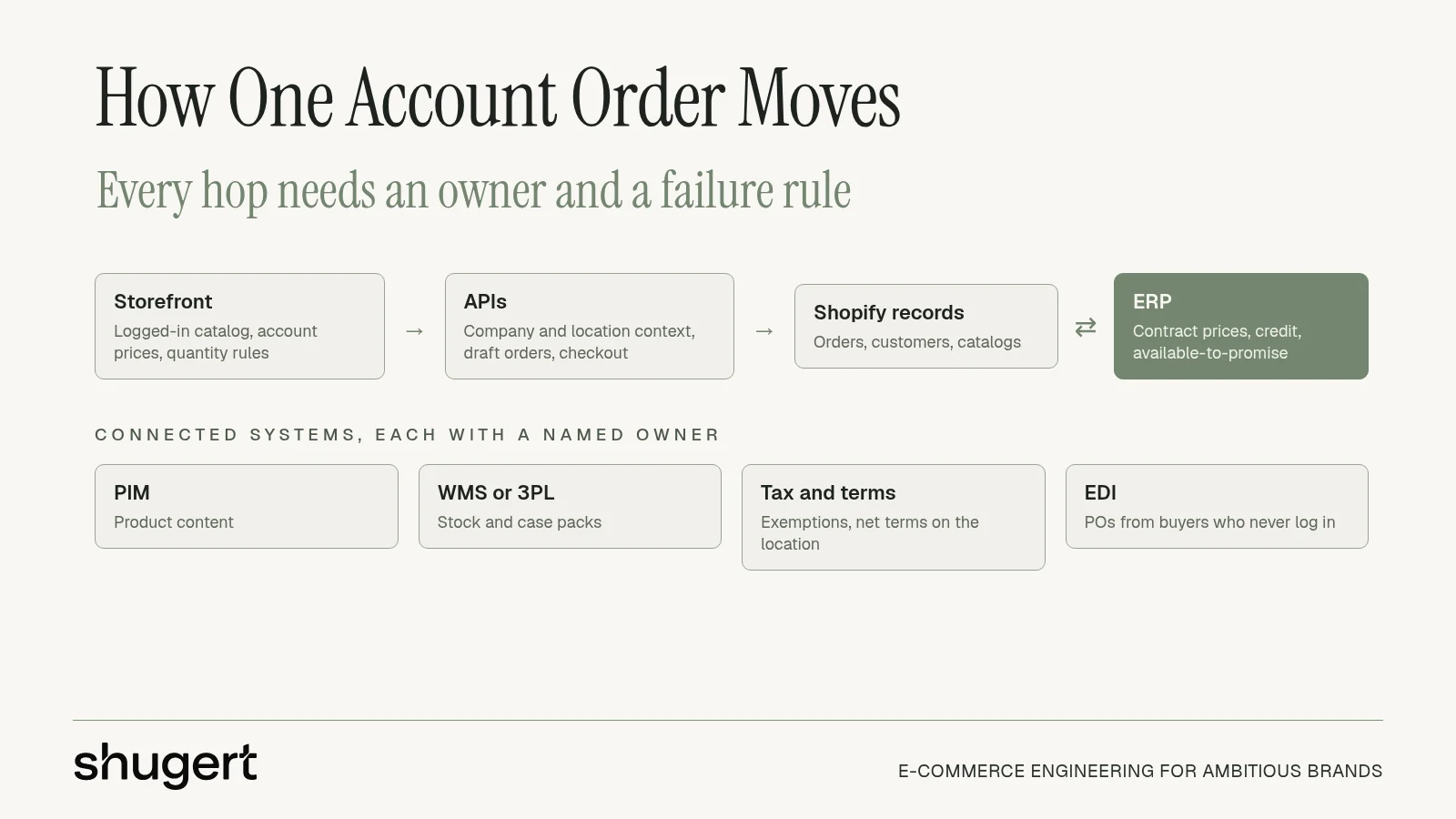
One account order touches more systems than the storefront shows. The storefront is the showroom: a Shopify theme, or a separate headless front end, shows a logged-in buyer only that account's catalog, prices, and quantity rules. APIs act as the order desk. They carry company and location context, catalog and price reads, inventory checks, draft orders for quotes, and checkout or order creation. The backend is the stockroom ledger. Shopify holds commerce records, while the ERP usually owns contract prices, credit, and often available-to-promise.
Native data model versus a separate front end
On native Shopify, storefront, checkout, and customer accounts share one data model. On a headless build, the team owns authentication, caching, and what the buyer sees when a price or stock call fails. A polished showroom on a stale price book produces confident wrong orders. Keep the separate front end only when a headless Shopify build is worth keeping. Otherwise each extra hop is another place where the purchasing location can get dropped.
| Hop | What it owns | Failure if stale |
|---|---|---|
| Storefront | Logged-in catalog, account prices, and quantity rules | Buyer confirms the wrong price or pack |
| APIs | Company and location context, price reads, draft orders, and checkout | Quote or cart ignores the purchasing location |
| Shopify commerce records | Orders, customers, and catalogs | Reorder history drifts from the account |
| ERP | Contract prices, credit, and often available-to-promise | A second price book survives in a spreadsheet or a rep's notes |
| PIM | Product content | Configured lines ship with incomplete specs |
| WMS or 3PL | Fulfillment stock and case packs | Portal shows units the warehouse cannot ship |
| Tax and payment terms | Exemptions and net terms on the company location | Invoice tax or due date does not match finance |
| EDI | Purchase orders and extranet replenishment | A cart build ignores buyers who never log in |
Every hop needs a named owner.
Integrations are the doors between those rooms. PIM feeds product content. A WMS or 3PL owns fulfillment. Tax handles exemptions. EDI covers buyers who never use a cart. The patterns behind connecting Shopify with retail ERP systems come down to three decisions: which system may change a record, how often it syncs, and what happens when the call fails. That contract gets a closer look in this note on Shopify ERP integration.
High-value flows need purchase-order capture, negotiated price checks, account permissions, inventory reservation, and idempotent order creation so a retry cannot duplicate the order. Write the ownership rules down per record type before build starts. The question that decides launch readiness is which system is allowed to change a price. When those rules span the ERP, quoting and account pricing at once, custom Shopify development for wholesale logic is usually where the implementation lives.
Quote Workflows and a Catalog That Syncs
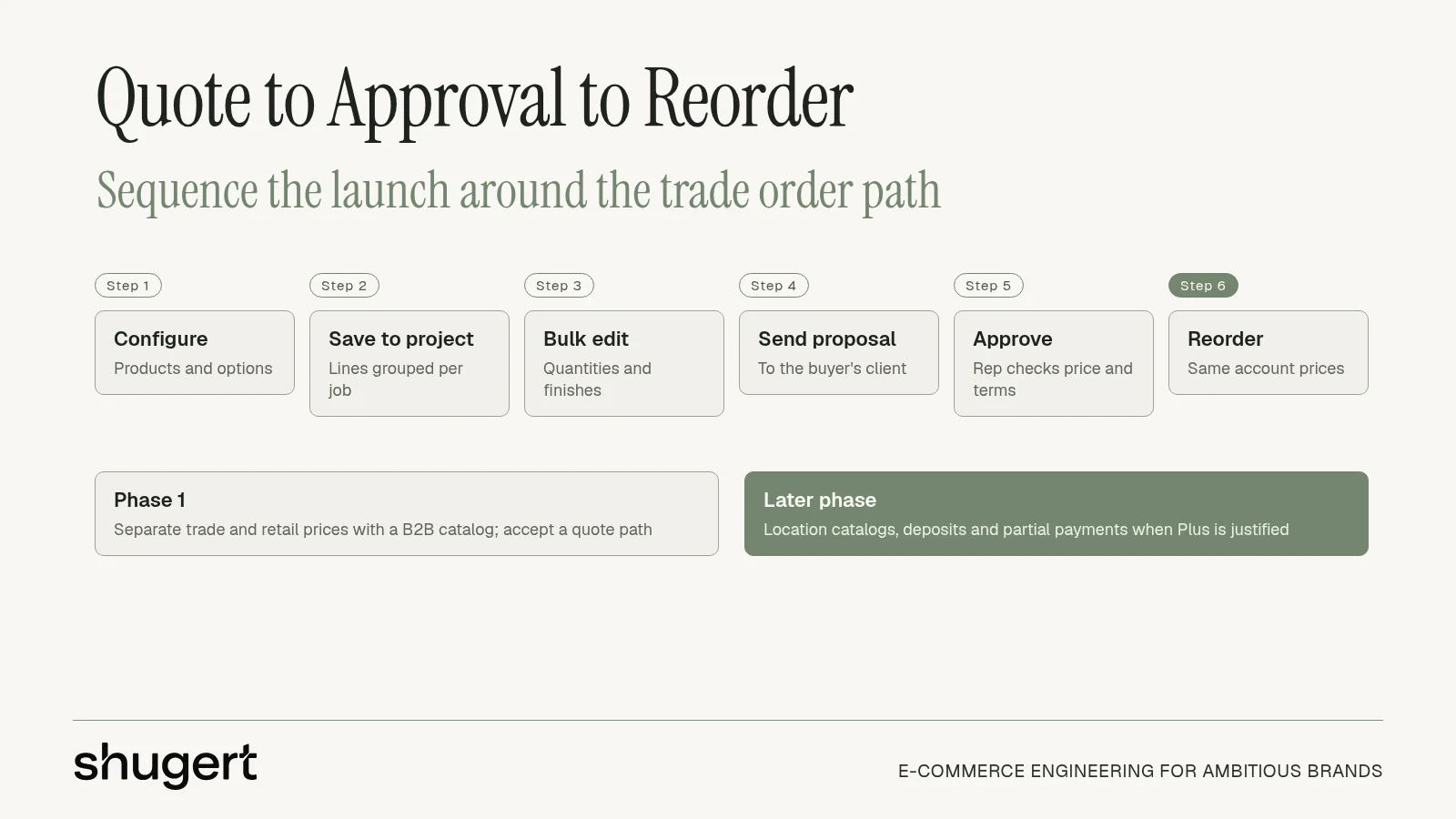
A furniture wholesale launch should be sequenced around the order path, not around a feature checklist. For trade accounts, the decisive flow is quote to approval to reorder, and the catalog has to keep serving that flow after the proposal is sent.
- Trade and homeowner prices can ship on a non-Plus plan first. A B2B catalog for trade accounts separates the two books within the three-catalog limit. Showing two prices on day one does not require Plus.
- Plus-only features can stay a later phase. The first release only has to show account pricing and accept a quote path. Location-specific catalogs, deposits, and partial payments can wait until the account count justifies Plus.
- Specifiers still do not buy from a cart. Designers configure products, save them to projects, edit lines in bulk, and forward a polished multi-line proposal to their own clients. A checkout cannot do that job.
What changes after launch is manual work, in specific places. Buyers place and reorder from their own account at their own prices instead of emailing orders in. Sales reps stop re-keying those orders. Inventory updates from the system that owns stock, instead of from a Friday spreadsheet. Quotes stay valid because the catalog, customer terms, and available quantities are read from the same records the order will use.
The same pattern on a tire catalog
Llantas Cavazos, a tire retailer that migrated 8,000+ SKUs to Shopify, connected inventory synchronization and product feeds as part of the migration. The category is tires; the wholesale reading is the same. Inventory and bundle availability have to update from one system, or the account portal offers stock the warehouse cannot ship.
Quotes set the furniture order path. Inventory sync is what kept the Llantas catalog honest.
Those are separate lessons. Do not merge them into one generic "the portal saved time" story. A specifier business still needs the proposal workflow after the catalog is accurate. A replenishment catalog still needs a live stock feed after quotes are out of scope. Build the path the buyer already uses, then remove the chore that breaks that path after launch.
One Price Book Before You Launch
A wholesale launch usually fails on data ownership before it fails on design. Customer-specific prices end up living in the ERP, in spreadsheets, and in reps' notes at the same time, and the three versions drift. Pick one price book before buildout starts, usually the ERP. Then map every company and location to a Shopify B2B catalog and price list, and set a sync owner and schedule so nobody edits price in Shopify just this once.
| Data set | Source of truth | Launch check |
|---|---|---|
| Products and content | PIM or the commerce catalog, one owner | Field map and image availability before import |
| Customer-specific prices | ERP, mapped to a catalog and price list | No second edit in Shopify or a spreadsheet |
| Companies, locations, and contacts | Commerce account model fed from the ERP customer master | Parent, location, tax, and permission relationships preserved |
| Inventory and case packs | ERP, WMS, or 3PL | Availability and pack quantities match what checkout will accept |
| Payment terms and tax exemption | Finance rules applied at the company location | Due dates and exemptions match the ERP on test orders |
| Credit limits and approvals | ERP or the credit system, not the theme | Exceptions route to a rep instead of a silent checkout failure |
What breaks first
Check edge cases before the catalog looks finished. Minimum order quantities, case packs, tax-exempt accounts, and net payment terms are what fail first after launch. A portal that shows a unit price and then rejects the only pack the warehouse ships pushes the account back to a rep.
In DHL's 2025 ecommerce trends report, business edition, 84% of surveyed B2B buyers said self-service tools matter when choosing a vendor. Leading frustrations were insufficient pricing transparency (39%), difficult reordering (35%), and slow vendor response (24%). Many wholesale brands still run ecommerce disconnected from the ERP, so adding more self-service only publishes stale stock and stale account prices faster. Buyers will trust the wrong number because the page looks finished.
Pre-launch checks
Use the Shopify migration planning guide to lock scope, then confirm what to verify in a Shopify data migration against live records.
- Record counts: Companies, locations, and contacts match the ERP customer master, including tax and permissions.
- Price spot check: A sample of account prices matches the ERP, with no second edit waiting in a sheet.
- One order per term: Each net term and each exemption produces the due date and tax finance expects.
- Failed-sync rehearsal: A stopped price or stock job surfaces an owner, not a silent success.
- Exception rule: Credit and quantity failures route to a rep instead of a dead checkout.
Shugert Marketing writes scope, assumptions, and acceptance criteria before work starts, and does not use junior handoffs or offshore subcontracting on Shopify work. That matters here because a bad price sync becomes an operations incident with a rep, a warehouse, and finance attached.
Request a Migration Scope for Wholesale
Bring three inputs to a scope review. First, whether orders arrive as carts, quotes, or EDI, because that decides whether checkout or a rep-owned quote flow carries the order. Second, how many catalogs and company locations the price books require, checked against the three-catalog cap off Plus and the 25-catalog cap on a company location. Third, which system owns prices today. On wholesale accounts that system is usually the ERP rather than a spreadsheet or a rep's notes, and the sync path out of it drives most of the integration work.
Those three answers shape the budget more than any feature comparison.
Migration and custom development projects start at $5,000, with timelines of 4 to 24 weeks. Monthly support starts at $1,495. Shugert Marketing is a Shopify Plus engineering agency that has delivered 30+ complex migrations across 35 markets, and recommends a scoped engagement when Plus, B2B, ERP, or 3PL integrations mean a failed cutover costs more than the project. A single product CSV imported into a finished store is the wrong fit. Integrations named in the scope cover ERP, PIM, WMS, and 3PL.
A cutover of this size also needs a redirect and QA sequence, not a weekend DNS flip. A five-phase website migration plan is a useful outside checklist for staging, redirects, and post-launch checks while the commercial rules are still being tested.
The returned scope should say whether Plus, standard Shopify, or middleware is the right first phase, name the single price source of truth, and list which payment terms, tax exemptions, and quantity rules sit in the launch test set. Request a migration scope with those three inputs attached.
Ship complex Shopify builds without breaking the store
Fashionable Inc. has relied on us for more than six years across three Shopify Plus stores. Read the case study
Most quotes returned within 1 business day